

Export ChatGPT / Gemini to Obsidian
Export ChatGPT, Gemini, Claude, DeepSeek conversations to Obsidian-compatible Markdown notes. Perfect for backlinks and knowledge graphs.
Why Developers and Note-Takers Love AI Exporter?
We preserve the structural information that matters most for your notes.
Lossless Format Preservation
Headers, lists, bold, and italics are all converted into standard Markdown syntax accurately.
Perfect Code Highlighting
Automatic language detection and fence markers preserve your code's highlighting in any editor.
LaTeX Formula Rendering
Complex math from DeepSeek and ChatGPT is correctly converted to LaTeX format for Markdown viewers.
Frontmatter Metadata
Automatically append YAML frontmatter like title, date, and URL for easy indexing in PKM tools.
Local Privacy Protection
Markdown generation happens entirely in your browser. Your sensitive notes never touch our servers.
Fast Batch & Merge
Merge multiple conversations into a single Markdown file for comprehensive archiving.
Markdown: The Bridge for Your Knowledge Workflow
From local notes to tech blogs, Markdown connects AI to everything you do.
Build an AI Knowledge Base
Import deep ChatGPT dialogues into Obsidian and use back-links to weave AI insights into your second brain.
Four Steps to Localize Your AI Chats
Simple, efficient, and focused on the best text experience.
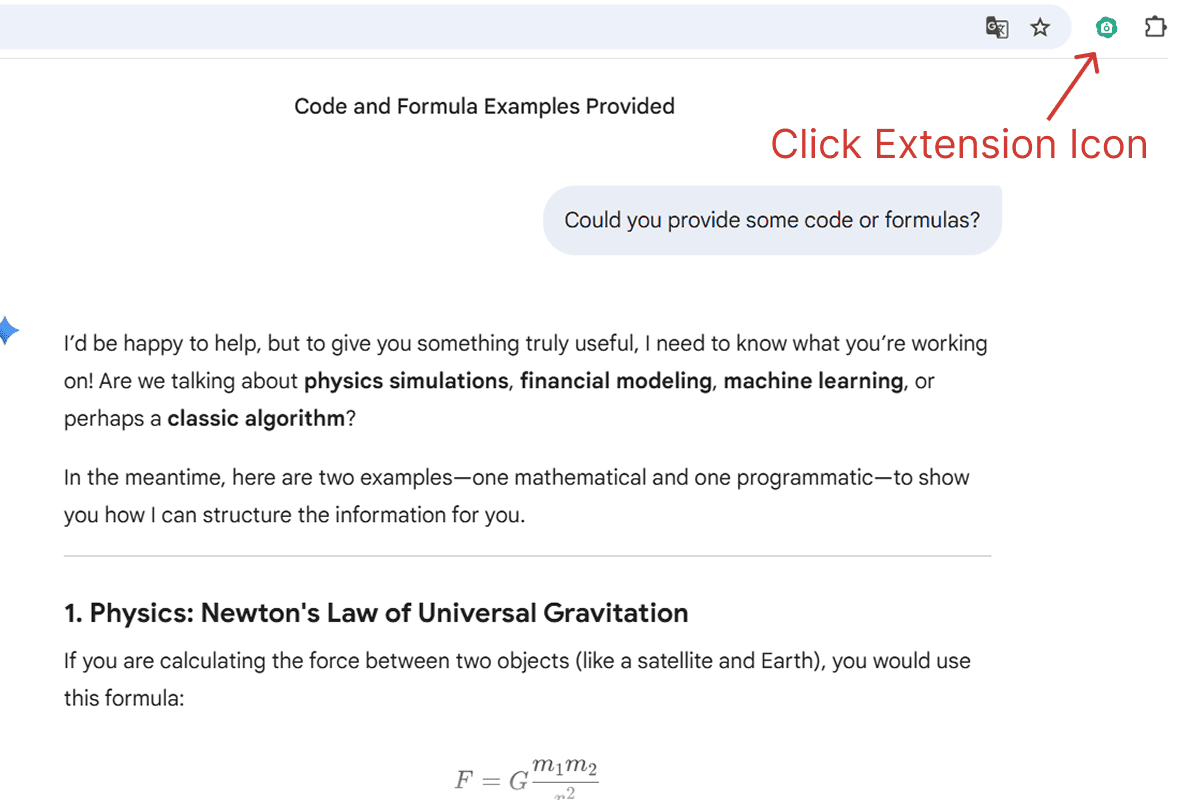
Install and Open Extension
Pin the extension in your browser for easy access and click to open the control window.
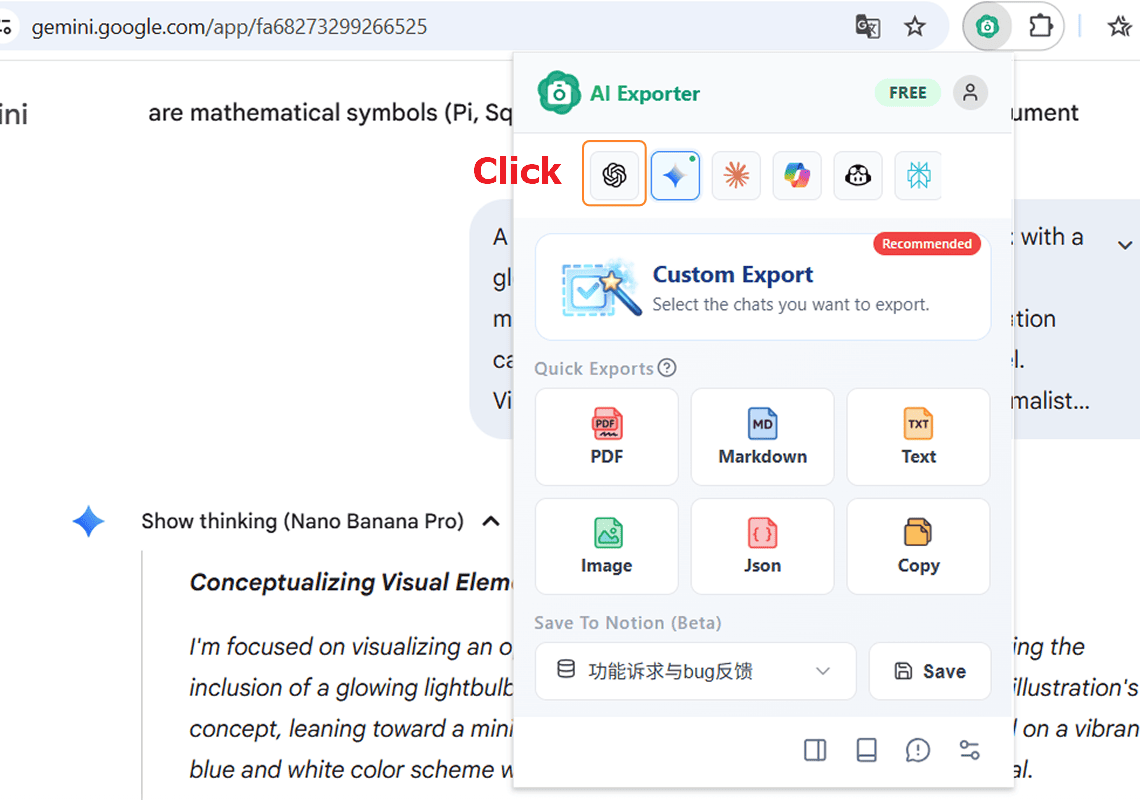
Go to Your AI Session
The extension supports ChatGPT, Gemini, DeepSeek, Claude, and more. Choose what to export.
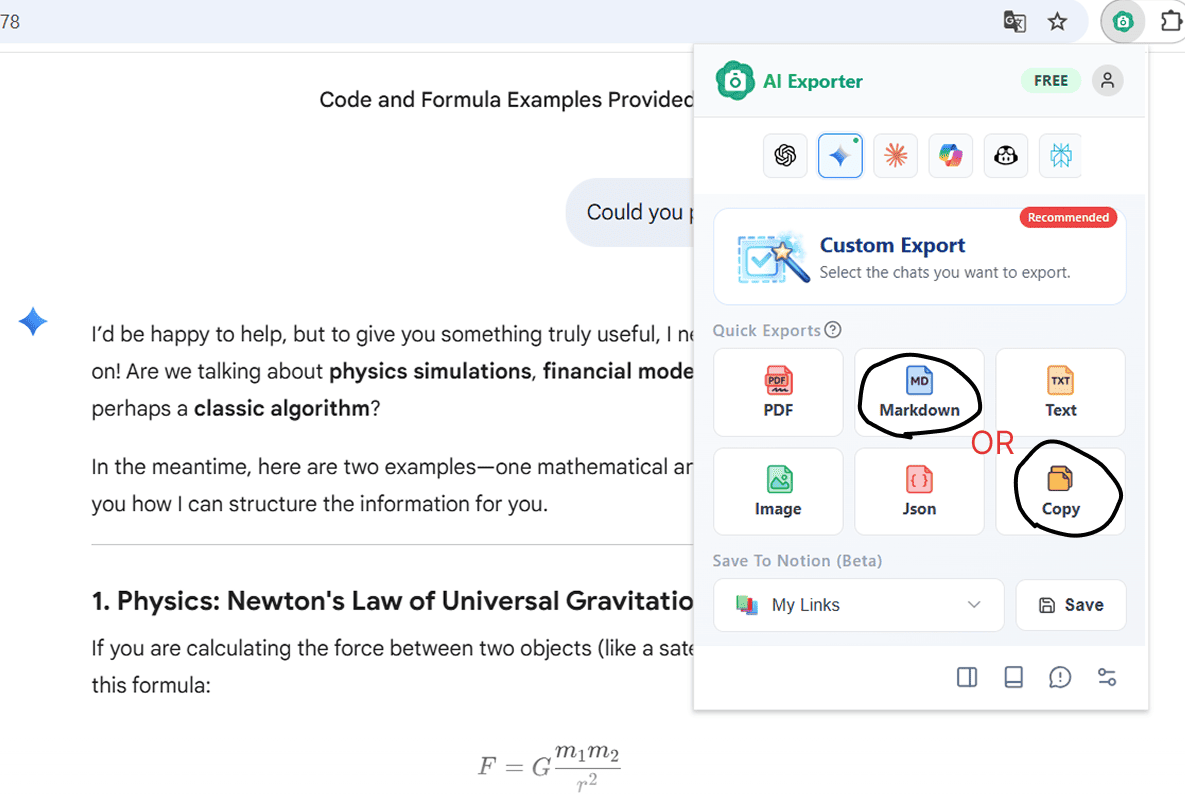
Select 'Markdown' Format
Click 'Markdown' and choose to either copy to clipboard or download as a .md file.
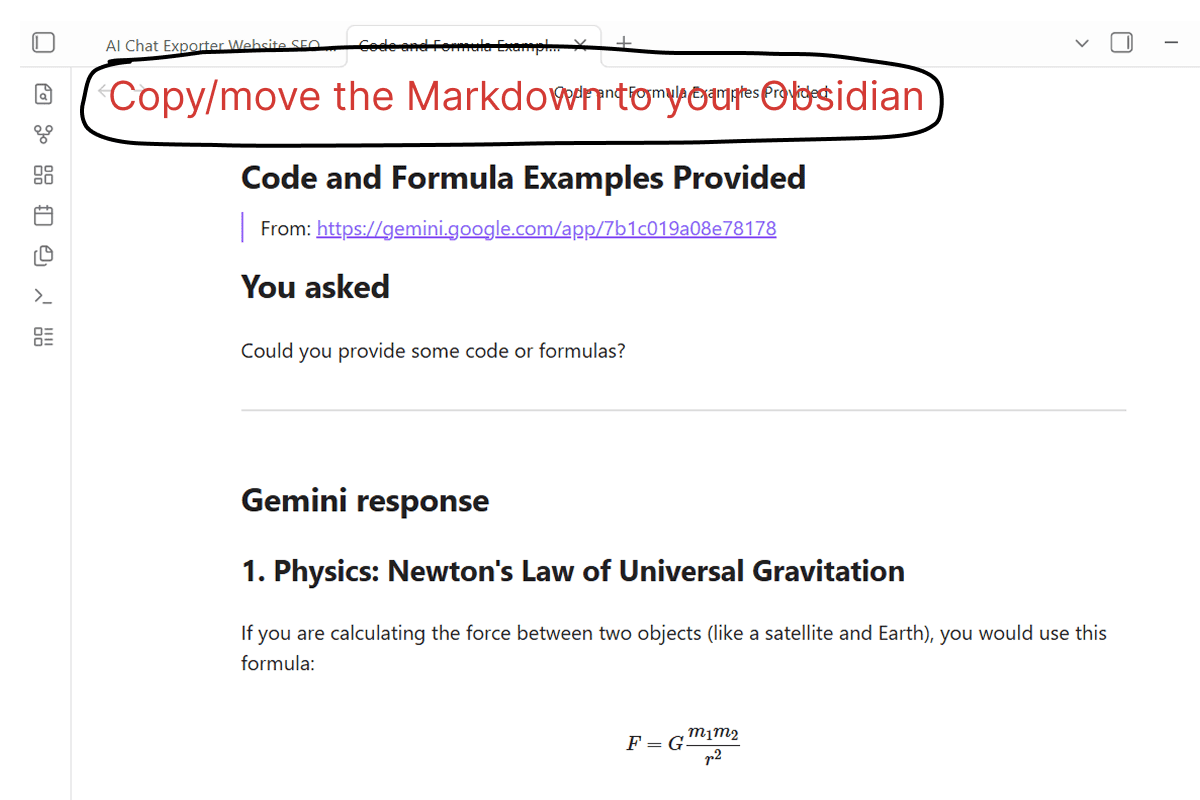
Paste and Save
Paste into Obsidian or VS Code. The formatting is perfect and ready for use.
Trusted by Thousands Worldwide
See how users are using AI Exporter to enhance their notes and documentation
“Perfect Tool for the major AI-Chats out there. Very consistent, does not loose any content, no code snippets, no additional thinking or other parts ... This tool is perfect to prepare your own AI-Chat-Database or if combined with Obsidian or similar, you get your own AI-Knowledge Database built with ease. 100% recommanded!”
“I use this daily to save code snippets from DeepSeek. The fencing and syntax highlighting are preserved perfectly when I paste into VS Code. A huge time saver for documentation.”
“Finally, I can export Claude's drafts directly to my Hugo blog folder. The YAML frontmatter support is exactly what I needed for my static site workflow.”
“It handles LaTeX formulas from ChatGPT beautifully. I export math explanations directly to my Logseq graph without breaking any equations.”
“The cleanest markdown exporter I've found. No weird artifacts, just pure text and formatting. Essential for organizing my study notes in Obsidian.”
“I use it to archive PRD discussions. Being able to select specific messages means I can export just the final requirements, not the whole brainstorming mess.”
“Perfect Tool for the major AI-Chats out there. Very consistent, does not loose any content, no code snippets, no additional thinking or other parts ... This tool is perfect to prepare your own AI-Chat-Database or if combined with Obsidian or similar, you get your own AI-Knowledge Database built with ease. 100% recommanded!”
“I use this daily to save code snippets from DeepSeek. The fencing and syntax highlighting are preserved perfectly when I paste into VS Code. A huge time saver for documentation.”
“Finally, I can export Claude's drafts directly to my Hugo blog folder. The YAML frontmatter support is exactly what I needed for my static site workflow.”
“It handles LaTeX formulas from ChatGPT beautifully. I export math explanations directly to my Logseq graph without breaking any equations.”
“The cleanest markdown exporter I've found. No weird artifacts, just pure text and formatting. Essential for organizing my study notes in Obsidian.”
“I use it to archive PRD discussions. Being able to select specific messages means I can export just the final requirements, not the whole brainstorming mess.”
“Perfect Tool for the major AI-Chats out there. Very consistent, does not loose any content, no code snippets, no additional thinking or other parts ... This tool is perfect to prepare your own AI-Chat-Database or if combined with Obsidian or similar, you get your own AI-Knowledge Database built with ease. 100% recommanded!”
“I use this daily to save code snippets from DeepSeek. The fencing and syntax highlighting are preserved perfectly when I paste into VS Code. A huge time saver for documentation.”
“Finally, I can export Claude's drafts directly to my Hugo blog folder. The YAML frontmatter support is exactly what I needed for my static site workflow.”
“It handles LaTeX formulas from ChatGPT beautifully. I export math explanations directly to my Logseq graph without breaking any equations.”
“The cleanest markdown exporter I've found. No weird artifacts, just pure text and formatting. Essential for organizing my study notes in Obsidian.”
“I use it to archive PRD discussions. Being able to select specific messages means I can export just the final requirements, not the whole brainstorming mess.”
“Perfect Tool for the major AI-Chats out there. Very consistent, does not loose any content, no code snippets, no additional thinking or other parts ... This tool is perfect to prepare your own AI-Chat-Database or if combined with Obsidian or similar, you get your own AI-Knowledge Database built with ease. 100% recommanded!”
“I use this daily to save code snippets from DeepSeek. The fencing and syntax highlighting are preserved perfectly when I paste into VS Code. A huge time saver for documentation.”
“Finally, I can export Claude's drafts directly to my Hugo blog folder. The YAML frontmatter support is exactly what I needed for my static site workflow.”
“It handles LaTeX formulas from ChatGPT beautifully. I export math explanations directly to my Logseq graph without breaking any equations.”
“The cleanest markdown exporter I've found. No weird artifacts, just pure text and formatting. Essential for organizing my study notes in Obsidian.”
“I use it to archive PRD discussions. Being able to select specific messages means I can export just the final requirements, not the whole brainstorming mess.”
Markdown Export FAQ
Just click 'Copy Markdown' in the extension and paste into a new Obsidian note. We handle the formatting for you.