
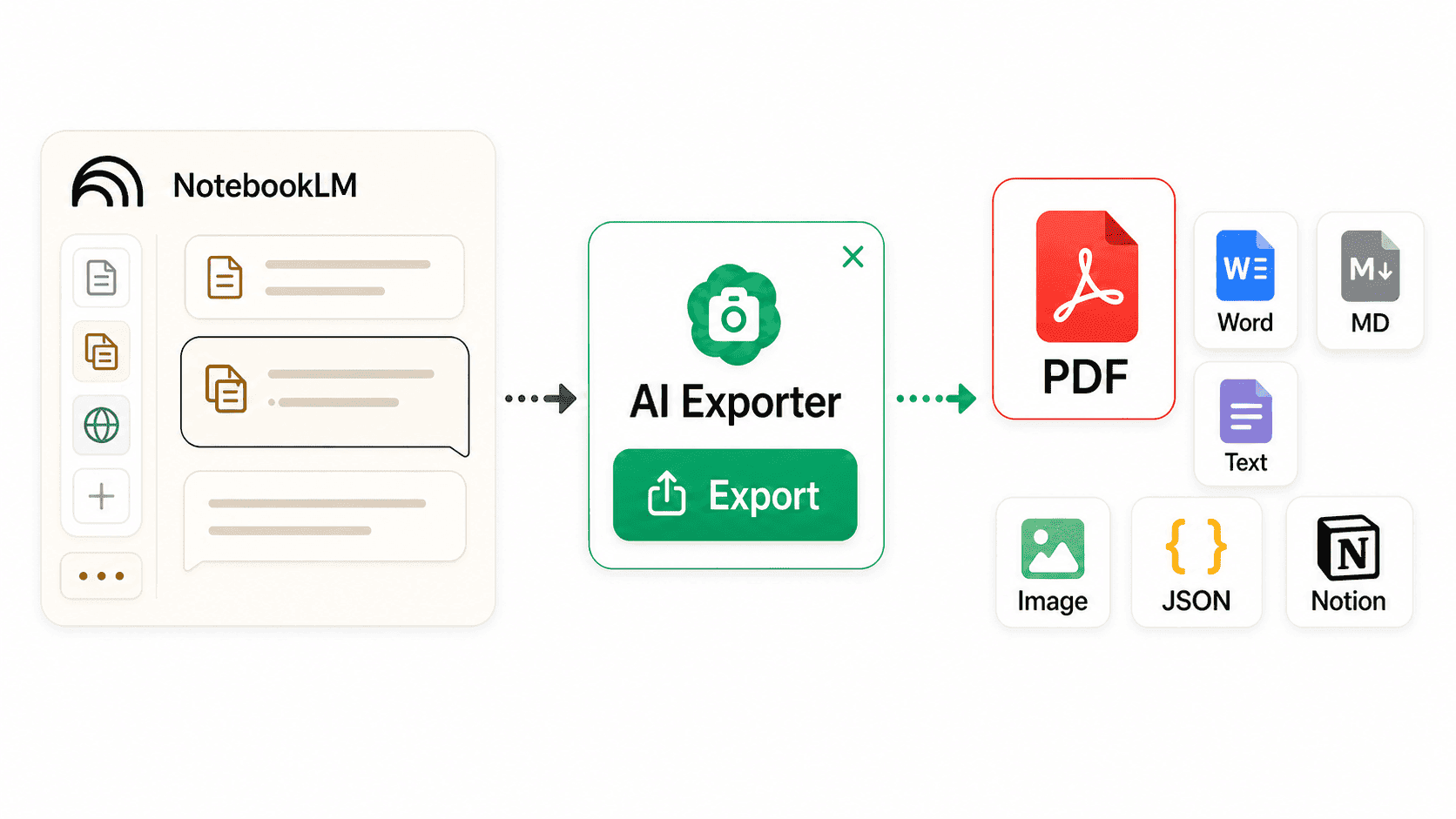
Export NotebookLM Notes and Answers to PDF
Turn source-grounded NotebookLM answers, study guides, project notes, and citation cues into clear documents for research archives, class review, handoffs, and knowledge bases.
Why NotebookLM Content Needs Structured Export
NotebookLM is more than chat replies. It combines sources, notes, summaries, and knowledge trails, so export should preserve context instead of copying only a few paragraphs.
Turn NotebookLM into readable documents
Export NotebookLM answers, notes, source summaries, and structured sections as PDFs for offline reading, annotation, sharing, or long-term archiving.
Layouts for study and research
Choose reading styles and font sizes that make long source summaries, study guides, Q&A records, and project briefs easier to scan after export.
Works across 13 AI websites
Besides NotebookLM, AI Exporter also supports ChatGPT, Claude, Gemini, DeepSeek, Grok, Perplexity, Kimi, Copilot, and other major AI tools.
Keep the source-driven research threadSpecific
NotebookLM is often used to ask questions around sources, compare materials, and generate study assets. Export preserves answer structure, source cues, lists, and tables as much as possible.
Archive long notebooks locally
Courses, paper collections, product docs, and project background files can all be turned into local records with long NotebookLM conversations and key outputs.
Save only valuable fragments
Select a few answers, a discussion section, or one important item to export, so exploratory side questions do not clutter the final document.
NotebookLM Workflows This Fits
When NotebookLM turns source material into answers, outlines, guides, or briefs, exporting makes the result easier to revisit and share.
Create review-ready course material
Export NotebookLM study guides, key takeaways, and Q&A generated from slides, papers, or textbooks as PDFs for printing, annotation, and review.
How to Export NotebookLM Content to PDF
After opening a notebook, you can export the full page, select only key items, or quickly save one important answer.

Install the AI Exporter extension
Install AI Exporter from the Chrome, Edge, or Firefox extension store and pin it to your browser toolbar. Then you can export directly from NotebookLM.
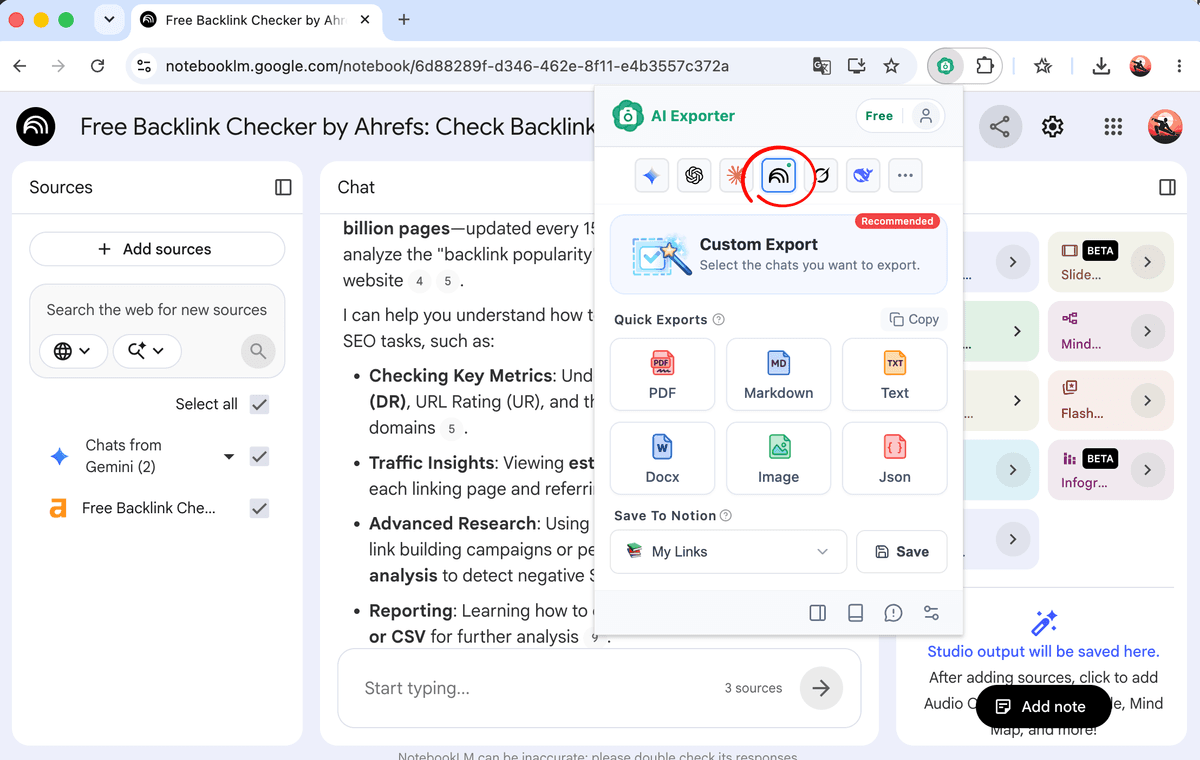
Open the NotebookLM notebook you want to save
Go to notebooklm.google.com and choose the notebook with course material, papers, reports, project docs, or other sources. Make sure the answers or notes you want are visible on the page.
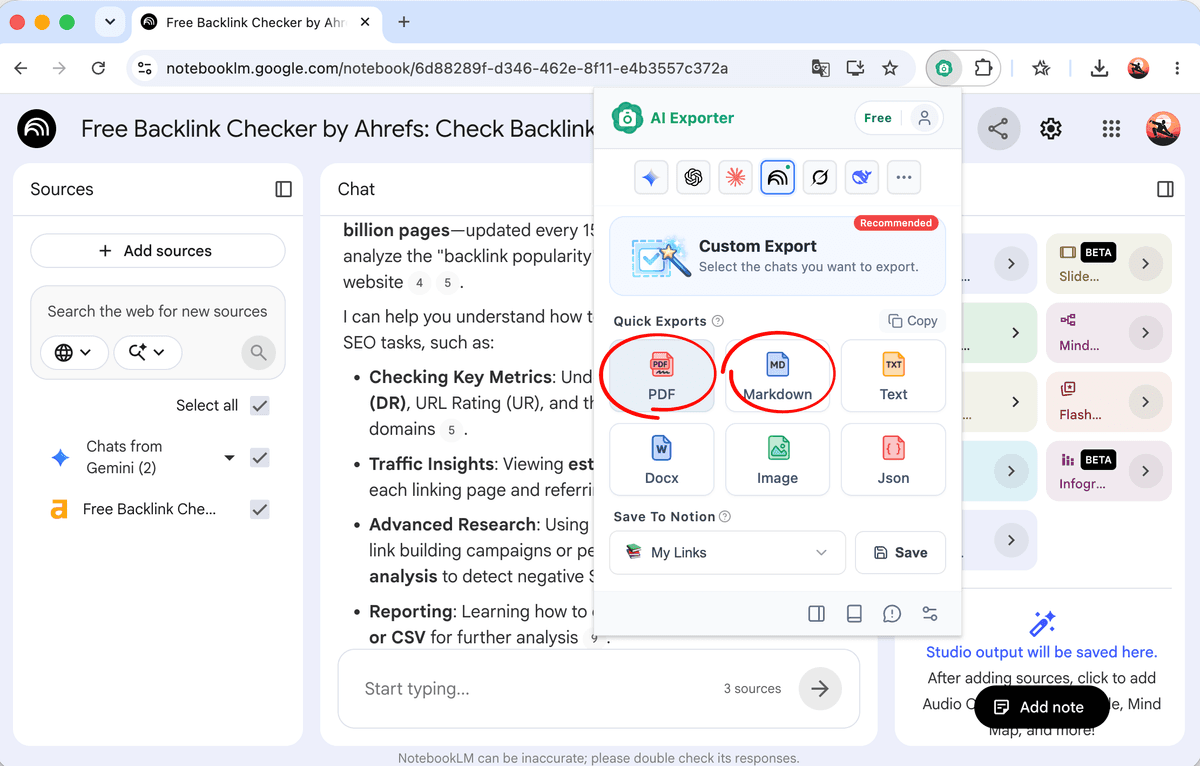
Export full NotebookLM content
Click the AI Exporter icon in the browser toolbar and choose PDF to turn the current NotebookLM answers, notes, and key material into a document.
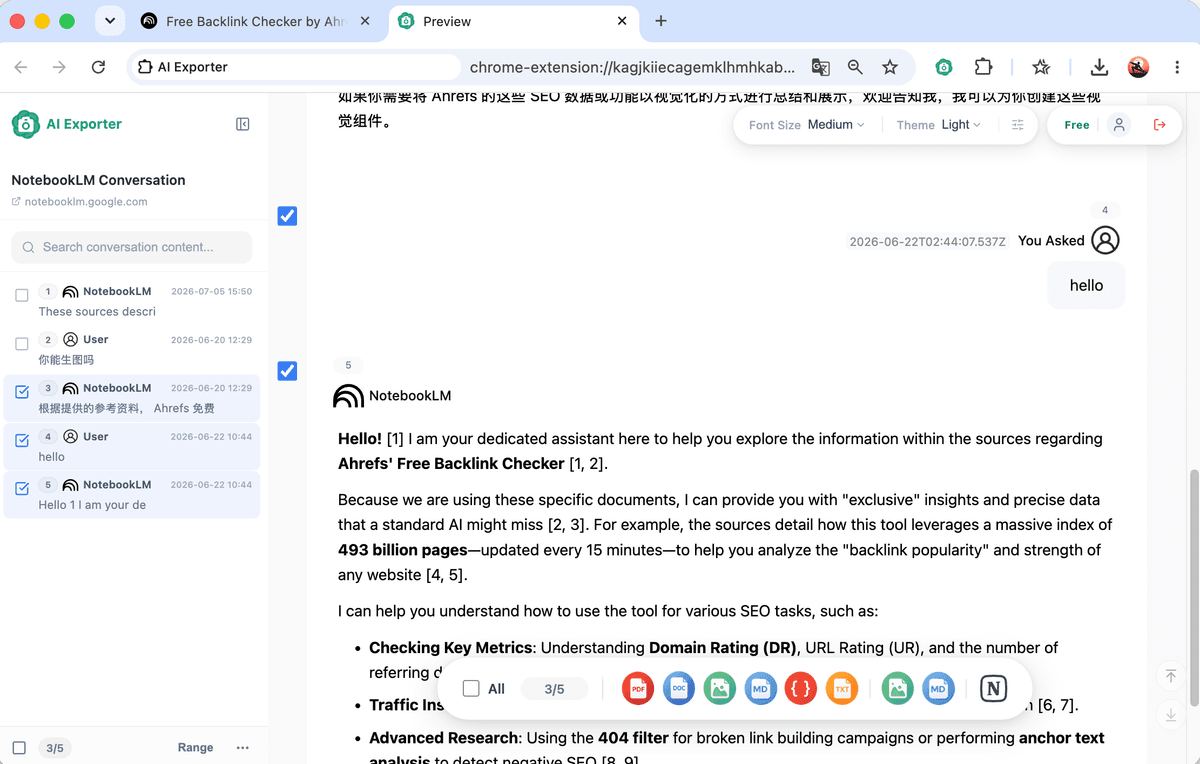
Select only key answers or source snippets
If you only need research conclusions, a study guide, or a few important answers, use selection mode and export only the checked content.
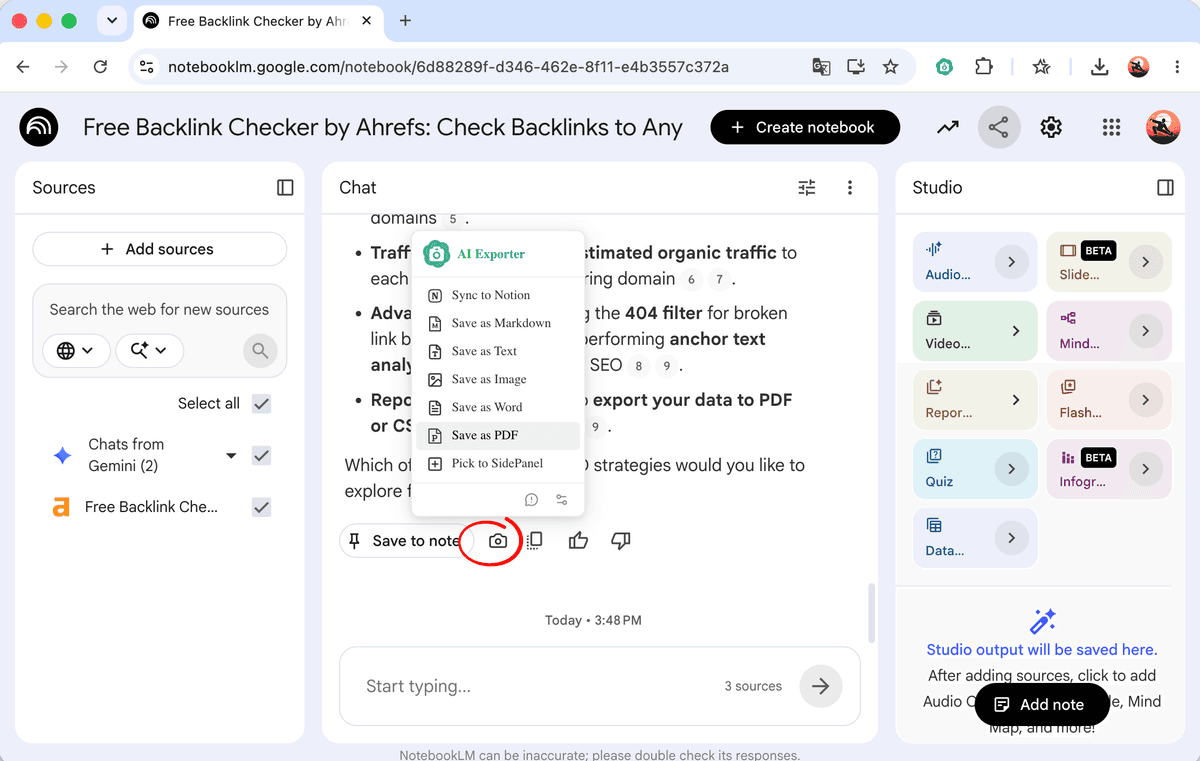
Quickly save a single answer
Hover near one NotebookLM answer and use the camera icon to export it as Word, PDF, Text, or JSON, or add it to the sidebar for later collection.
How Users Turn NotebookLM into a Stable Knowledge Base
NotebookLM is where many people understand source material; exported documents become the medium for review, sharing, and long-term organization.
“I put papers and course material into NotebookLM, then export the key answers as PDFs. During review, I do not need to reopen every source file.”
“NotebookLM is great for literature synthesis, but the output needs a place to live. Exporting lets me keep source summaries, questions, and conclusions in my research log.”
“We use NotebookLM to analyze interviews and competitor material. The exported PDF can be shared directly as project background.”
“I let NotebookLM organize large source sets, then export the result. Topic meetings, script planning, and fact checks become easier.”
“What matters to me is turning scattered source answers into stable documents. PDF, Markdown, and Notion sync are useful for building a knowledge base.”
“NotebookLM helps compare different source narratives. Exporting gives me a snapshot of the research stage, so I can see how the reasoning evolved later.”
“When there are many sources, NotebookLM answers need to be archived quickly. This export flow helps me save leads and background summaries fast.”
“I upload class material to NotebookLM and export the study guide. It is clearer than screenshots and much faster than manual copy-paste.”
“Project material and meeting context are often scattered. After summarizing them in NotebookLM, exporting to PDF makes onboarding much easier.”
“I put papers and course material into NotebookLM, then export the key answers as PDFs. During review, I do not need to reopen every source file.”
“NotebookLM is great for literature synthesis, but the output needs a place to live. Exporting lets me keep source summaries, questions, and conclusions in my research log.”
“We use NotebookLM to analyze interviews and competitor material. The exported PDF can be shared directly as project background.”
“I let NotebookLM organize large source sets, then export the result. Topic meetings, script planning, and fact checks become easier.”
“What matters to me is turning scattered source answers into stable documents. PDF, Markdown, and Notion sync are useful for building a knowledge base.”
“NotebookLM helps compare different source narratives. Exporting gives me a snapshot of the research stage, so I can see how the reasoning evolved later.”
“When there are many sources, NotebookLM answers need to be archived quickly. This export flow helps me save leads and background summaries fast.”
“I upload class material to NotebookLM and export the study guide. It is clearer than screenshots and much faster than manual copy-paste.”
“Project material and meeting context are often scattered. After summarizing them in NotebookLM, exporting to PDF makes onboarding much easier.”
“I put papers and course material into NotebookLM, then export the key answers as PDFs. During review, I do not need to reopen every source file.”
“NotebookLM is great for literature synthesis, but the output needs a place to live. Exporting lets me keep source summaries, questions, and conclusions in my research log.”
“We use NotebookLM to analyze interviews and competitor material. The exported PDF can be shared directly as project background.”
“I let NotebookLM organize large source sets, then export the result. Topic meetings, script planning, and fact checks become easier.”
“What matters to me is turning scattered source answers into stable documents. PDF, Markdown, and Notion sync are useful for building a knowledge base.”
“NotebookLM helps compare different source narratives. Exporting gives me a snapshot of the research stage, so I can see how the reasoning evolved later.”
“When there are many sources, NotebookLM answers need to be archived quickly. This export flow helps me save leads and background summaries fast.”
“I upload class material to NotebookLM and export the study guide. It is clearer than screenshots and much faster than manual copy-paste.”
“Project material and meeting context are often scattered. After summarizing them in NotebookLM, exporting to PDF makes onboarding much easier.”
“I put papers and course material into NotebookLM, then export the key answers as PDFs. During review, I do not need to reopen every source file.”
“NotebookLM is great for literature synthesis, but the output needs a place to live. Exporting lets me keep source summaries, questions, and conclusions in my research log.”
“We use NotebookLM to analyze interviews and competitor material. The exported PDF can be shared directly as project background.”
“I let NotebookLM organize large source sets, then export the result. Topic meetings, script planning, and fact checks become easier.”
“What matters to me is turning scattered source answers into stable documents. PDF, Markdown, and Notion sync are useful for building a knowledge base.”
“NotebookLM helps compare different source narratives. Exporting gives me a snapshot of the research stage, so I can see how the reasoning evolved later.”
“When there are many sources, NotebookLM answers need to be archived quickly. This export flow helps me save leads and background summaries fast.”
“I upload class material to NotebookLM and export the study guide. It is clearer than screenshots and much faster than manual copy-paste.”
“Project material and meeting context are often scattered. After summarizing them in NotebookLM, exporting to PDF makes onboarding much easier.”
NotebookLM to PDF FAQs
Install AI Exporter, open a notebook on notebooklm.google.com, click the browser extension icon, and choose PDF. The current answers, notes, and source summaries are organized into a document.