
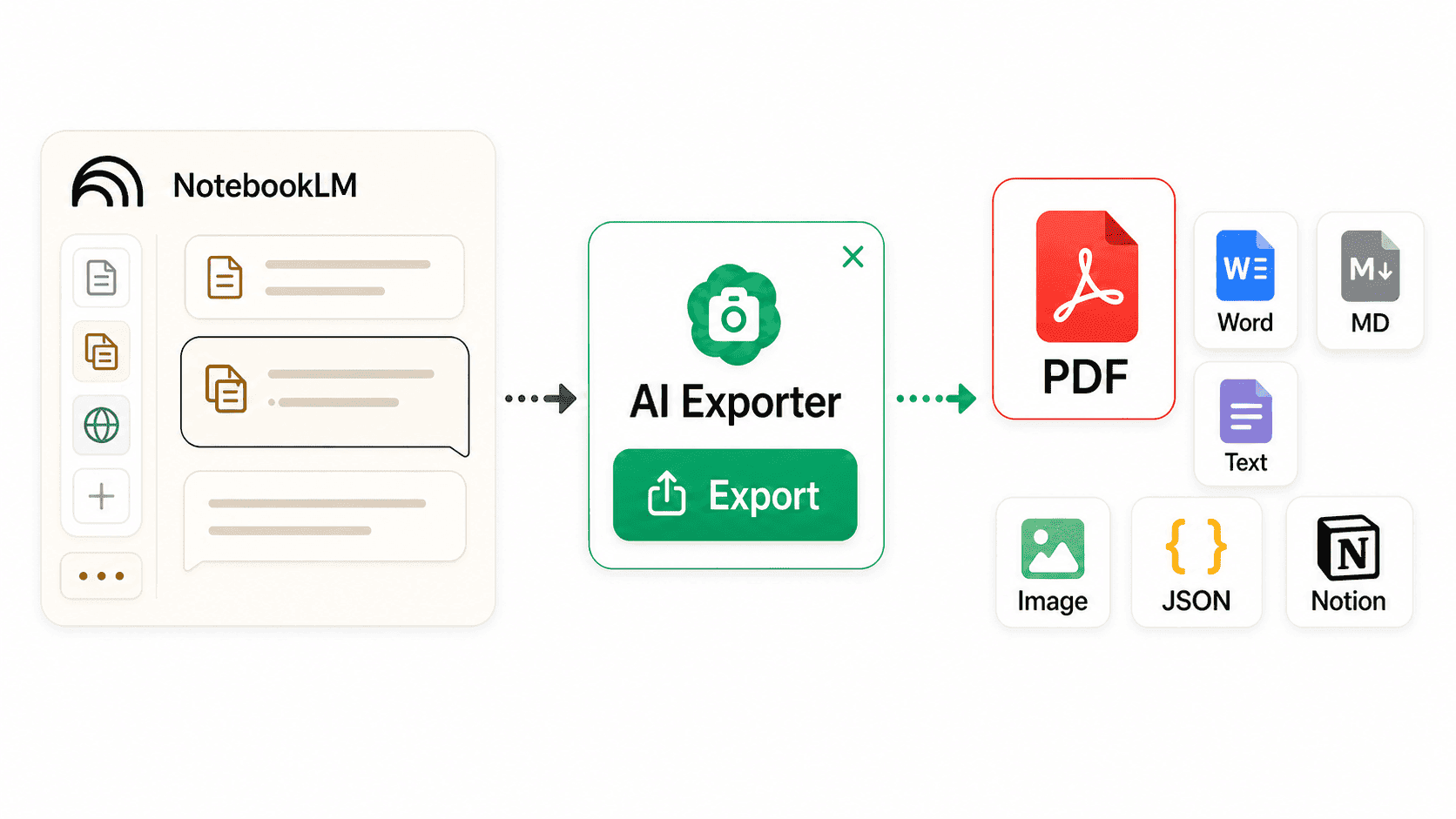
NotebookLM-Notizen und Antworten als PDF exportieren
Wandle quellenbasierte NotebookLM-Antworten, Lernleitfäden, Projektnotizen und Zitathinweise in klare Dokumente für Forschung, Kurswiederholung, Übergaben und Wissensdatenbanken um.
Warum NotebookLM-Inhalte strukturiert exportiert werden sollten
NotebookLM besteht nicht nur aus Chat-Antworten, sondern aus Quellen, Notizen, Zusammenfassungen und Wissensspuren. Beim Export sollte dieser Kontext erhalten bleiben.
NotebookLM in lesbare Dokumente verwandeln
Exportiere NotebookLM-Antworten, Notizen, Quellenzusammenfassungen und strukturierte Abschnitte als PDF für Offline-Lesen, Markierungen, Teilen oder Archivierung.
Layout für Studium und Forschung
Wähle Lesestile und Schriftgrößen, damit lange Quellenzusammenfassungen, Lernleitfäden, Q&A und Projektbriefings nach dem Export leichter zu überfliegen sind.
Unterstützt 13 KI-Websites
Neben NotebookLM unterstützt AI Exporter auch ChatGPT, Claude, Gemini, DeepSeek, Grok, Perplexity, Kimi, Copilot und weitere KI-Tools.
Quellengetriebenen Forschungsfaden bewahrenSpecific
NotebookLM wird oft für Fragen zu Quellen, Materialvergleiche und Lernmaterial genutzt. Der Export erhält Antwortstruktur, Quellenhinweise, Listen und Tabellen möglichst gut.
Lange Notebooks lokal archivieren
Kursmaterial, Paper-Sammlungen, Produktdokumente und Projektunterlagen lassen sich zusammen mit langen NotebookLM-Gesprächen und wichtigen Outputs lokal speichern.
Nur wertvolle Ausschnitte speichern
Wähle einzelne Antworten, einen Diskussionsabschnitt oder einen wichtigen Punkt aus, damit irrelevante Erkundungsfragen das Dokument nicht überladen.
Passende NotebookLM-Workflows
Wenn NotebookLM Quellen in Antworten, Gliederungen, Leitfäden oder Briefings verwandelt, ist ein Export besser für Rückblick und Weitergabe.
Wiederholbares Kursmaterial erstellen
Exportiere Lernleitfäden, Kernaussagen und Q&A aus Folien, Papers oder Lehrbüchern als PDF zum Drucken, Markieren und Wiederholen.
So exportierst du NotebookLM-Inhalte als PDF
Nach dem Öffnen eines Notebooks kannst du alles exportieren, nur wichtige Inhalte auswählen oder eine einzelne Antwort speichern.

AI Exporter installieren
Installiere AI Exporter aus dem Chrome-, Edge- oder Firefox-Store und hefte ihn an die Browserleiste. Danach kannst du direkt aus NotebookLM exportieren.
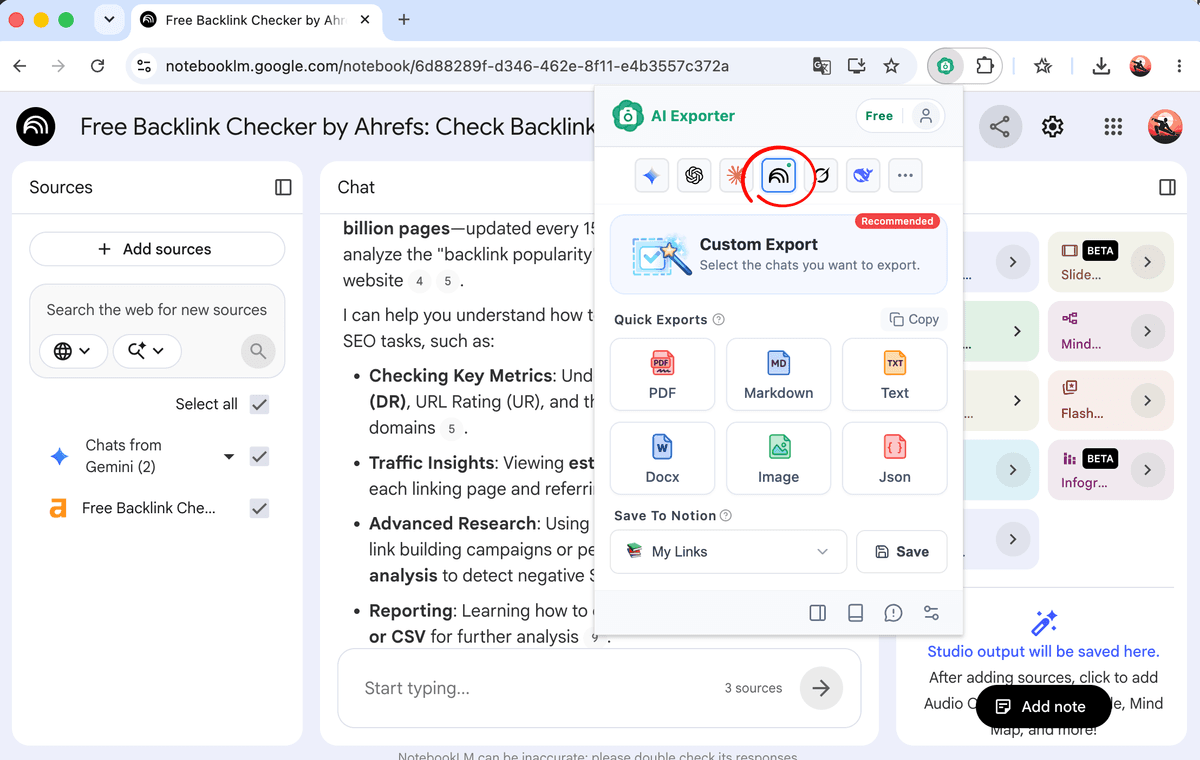
Das NotebookLM-Notebook öffnen
Gehe zu notebooklm.google.com und wähle das Notebook mit Kursmaterial, Papers, Reports, Projektdokumenten oder anderen Quellen. Die gewünschten Antworten oder Notizen sollten sichtbar sein.
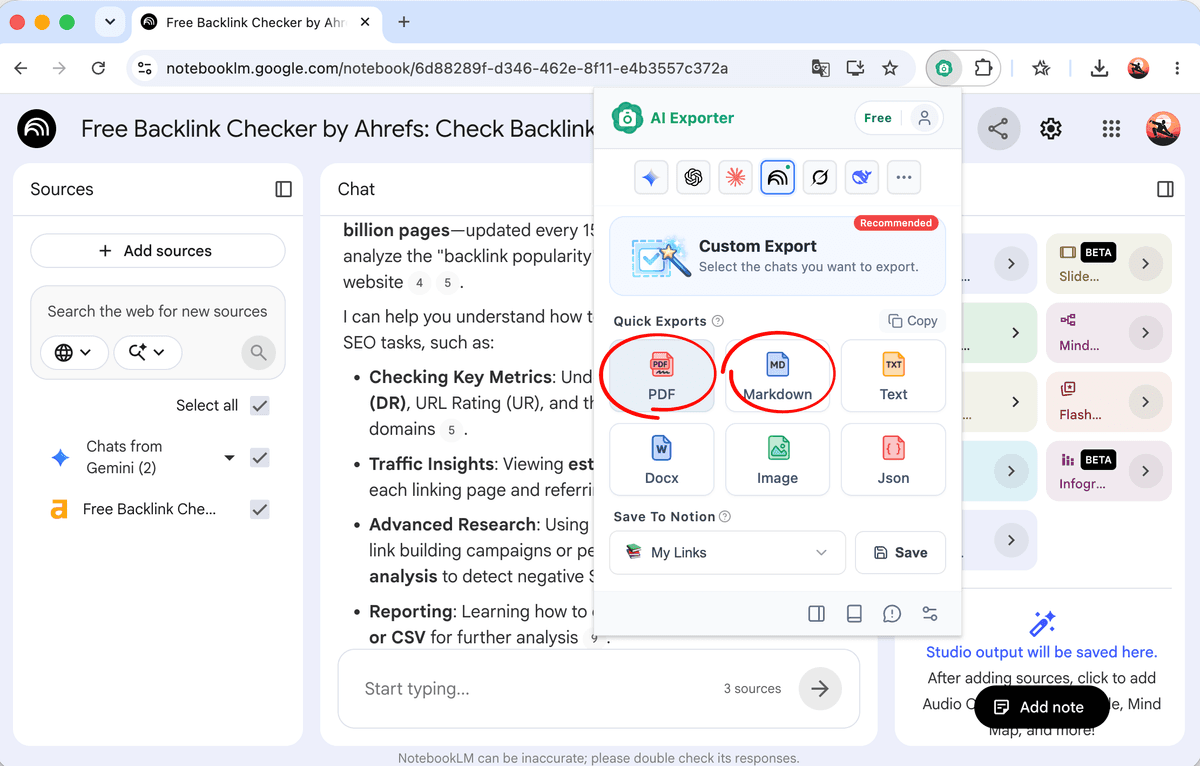
Vollständige NotebookLM-Inhalte exportieren
Klicke auf das AI Exporter-Symbol und wähle PDF, um die aktuellen NotebookLM-Antworten, Notizen und wichtigsten Materialien als Dokument zu speichern.
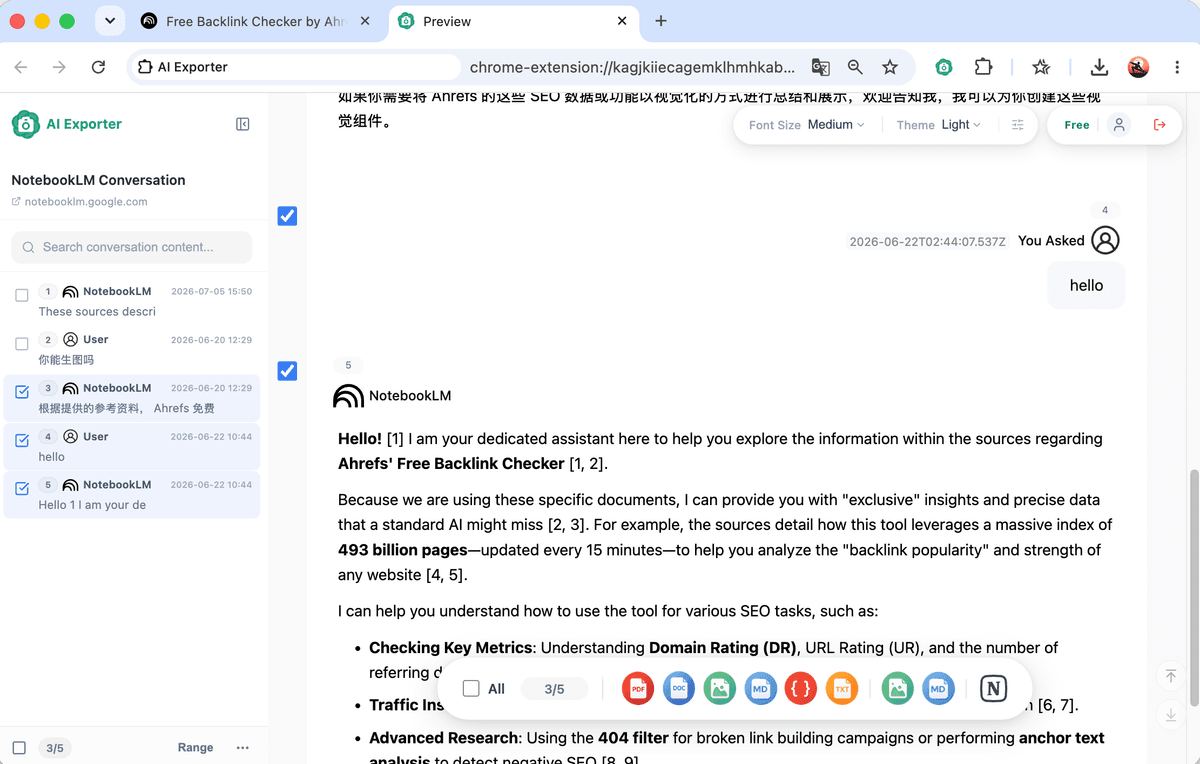
Nur wichtige Antworten oder Quellenabschnitte wählen
Wenn du nur Forschungsergebnisse, einen Lernleitfaden oder wichtige Antworten brauchst, nutze den Auswahlmodus und exportiere nur markierte Inhalte.
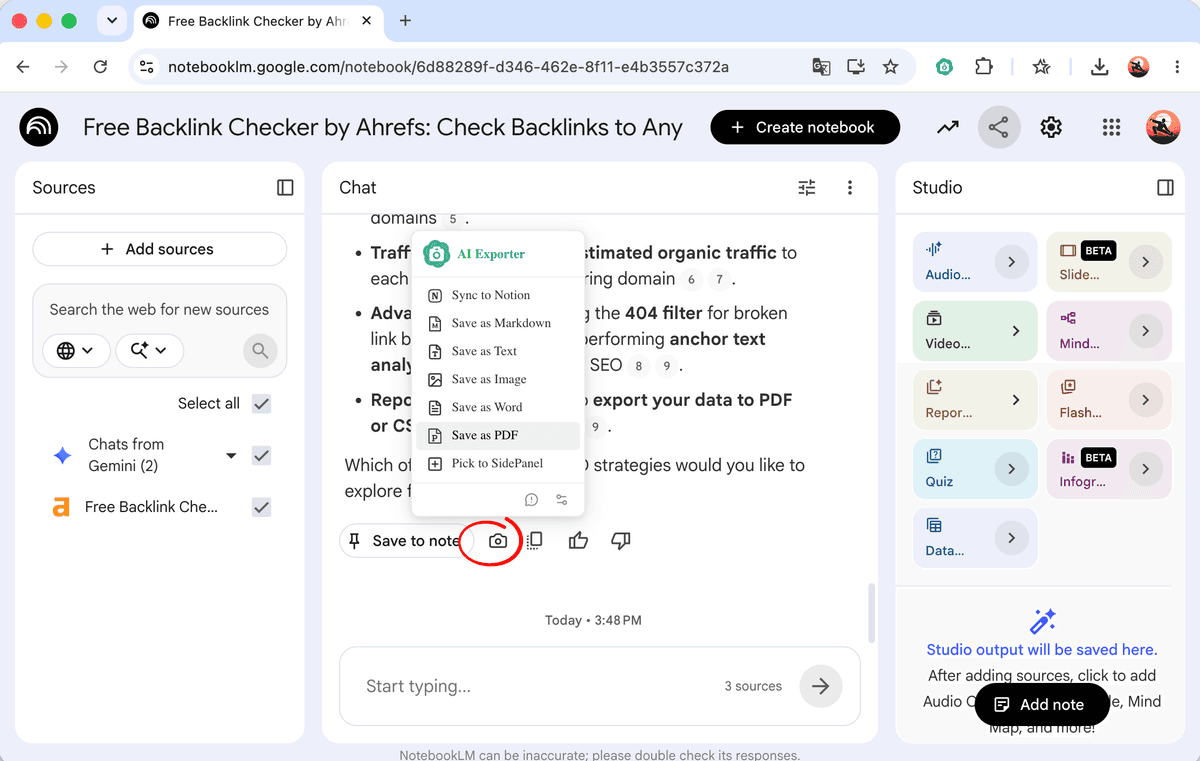
Eine einzelne Antwort schnell speichern
Bewege den Mauszeiger über eine NotebookLM-Antwort und nutze das Kamera-Symbol, um sie als Word, PDF, Text oder JSON zu exportieren oder für später in die Seitenleiste zu legen.
Wie Nutzer NotebookLM in eine stabile Wissensbasis verwandeln
NotebookLM hilft beim Verstehen von Quellen; exportierte Dokumente dienen zum Wiederholen, Teilen und langfristigen Organisieren.
“Ich lade Papers und Kursmaterial in NotebookLM und exportiere wichtige Antworten als PDF. Beim Lernen muss ich nicht jede Quelldatei erneut öffnen.”
“NotebookLM eignet sich gut für Literatursynthese, aber die Ergebnisse brauchen einen festen Ort. Der Export bringt Quellenzusammenfassungen und Schlussfolgerungen ins Forschungslog.”
“Wir analysieren Interviews und Wettbewerbsinfos mit NotebookLM. Das exportierte PDF lässt sich direkt als Projektkontext teilen.”
“Ich lasse NotebookLM große Quellenmengen sortieren und exportiere das Ergebnis. Themenmeetings, Skripte und Faktenchecks werden einfacher.”
“Mir ist wichtig, verstreute Quellenantworten in stabile Dokumente zu verwandeln. PDF, Markdown und Notion-Sync helfen beim Aufbau der Wissensbasis.”
“NotebookLM hilft mir, unterschiedliche Quellen zu vergleichen. Exportierte Dokumente halten einen Forschungsstand fest.”
“Bei vielen Quellen müssen NotebookLM-Antworten schnell archiviert werden. Der Export speichert Hinweise und Hintergrundzusammenfassungen.”
“Ich lade Kursmaterial hoch und exportiere Lernleitfäden. Das ist klarer als Screenshots und schneller als Copy-Paste.”
“Projektmaterial ist oft verstreut. Nach der NotebookLM-Zusammenfassung erleichtert der PDF-Export das Onboarding neuer Teammitglieder.”
“Ich lade Papers und Kursmaterial in NotebookLM und exportiere wichtige Antworten als PDF. Beim Lernen muss ich nicht jede Quelldatei erneut öffnen.”
“NotebookLM eignet sich gut für Literatursynthese, aber die Ergebnisse brauchen einen festen Ort. Der Export bringt Quellenzusammenfassungen und Schlussfolgerungen ins Forschungslog.”
“Wir analysieren Interviews und Wettbewerbsinfos mit NotebookLM. Das exportierte PDF lässt sich direkt als Projektkontext teilen.”
“Ich lasse NotebookLM große Quellenmengen sortieren und exportiere das Ergebnis. Themenmeetings, Skripte und Faktenchecks werden einfacher.”
“Mir ist wichtig, verstreute Quellenantworten in stabile Dokumente zu verwandeln. PDF, Markdown und Notion-Sync helfen beim Aufbau der Wissensbasis.”
“NotebookLM hilft mir, unterschiedliche Quellen zu vergleichen. Exportierte Dokumente halten einen Forschungsstand fest.”
“Bei vielen Quellen müssen NotebookLM-Antworten schnell archiviert werden. Der Export speichert Hinweise und Hintergrundzusammenfassungen.”
“Ich lade Kursmaterial hoch und exportiere Lernleitfäden. Das ist klarer als Screenshots und schneller als Copy-Paste.”
“Projektmaterial ist oft verstreut. Nach der NotebookLM-Zusammenfassung erleichtert der PDF-Export das Onboarding neuer Teammitglieder.”
“Ich lade Papers und Kursmaterial in NotebookLM und exportiere wichtige Antworten als PDF. Beim Lernen muss ich nicht jede Quelldatei erneut öffnen.”
“NotebookLM eignet sich gut für Literatursynthese, aber die Ergebnisse brauchen einen festen Ort. Der Export bringt Quellenzusammenfassungen und Schlussfolgerungen ins Forschungslog.”
“Wir analysieren Interviews und Wettbewerbsinfos mit NotebookLM. Das exportierte PDF lässt sich direkt als Projektkontext teilen.”
“Ich lasse NotebookLM große Quellenmengen sortieren und exportiere das Ergebnis. Themenmeetings, Skripte und Faktenchecks werden einfacher.”
“Mir ist wichtig, verstreute Quellenantworten in stabile Dokumente zu verwandeln. PDF, Markdown und Notion-Sync helfen beim Aufbau der Wissensbasis.”
“NotebookLM hilft mir, unterschiedliche Quellen zu vergleichen. Exportierte Dokumente halten einen Forschungsstand fest.”
“Bei vielen Quellen müssen NotebookLM-Antworten schnell archiviert werden. Der Export speichert Hinweise und Hintergrundzusammenfassungen.”
“Ich lade Kursmaterial hoch und exportiere Lernleitfäden. Das ist klarer als Screenshots und schneller als Copy-Paste.”
“Projektmaterial ist oft verstreut. Nach der NotebookLM-Zusammenfassung erleichtert der PDF-Export das Onboarding neuer Teammitglieder.”
“Ich lade Papers und Kursmaterial in NotebookLM und exportiere wichtige Antworten als PDF. Beim Lernen muss ich nicht jede Quelldatei erneut öffnen.”
“NotebookLM eignet sich gut für Literatursynthese, aber die Ergebnisse brauchen einen festen Ort. Der Export bringt Quellenzusammenfassungen und Schlussfolgerungen ins Forschungslog.”
“Wir analysieren Interviews und Wettbewerbsinfos mit NotebookLM. Das exportierte PDF lässt sich direkt als Projektkontext teilen.”
“Ich lasse NotebookLM große Quellenmengen sortieren und exportiere das Ergebnis. Themenmeetings, Skripte und Faktenchecks werden einfacher.”
“Mir ist wichtig, verstreute Quellenantworten in stabile Dokumente zu verwandeln. PDF, Markdown und Notion-Sync helfen beim Aufbau der Wissensbasis.”
“NotebookLM hilft mir, unterschiedliche Quellen zu vergleichen. Exportierte Dokumente halten einen Forschungsstand fest.”
“Bei vielen Quellen müssen NotebookLM-Antworten schnell archiviert werden. Der Export speichert Hinweise und Hintergrundzusammenfassungen.”
“Ich lade Kursmaterial hoch und exportiere Lernleitfäden. Das ist klarer als Screenshots und schneller als Copy-Paste.”
“Projektmaterial ist oft verstreut. Nach der NotebookLM-Zusammenfassung erleichtert der PDF-Export das Onboarding neuer Teammitglieder.”
NotebookLM to PDF FAQ
Installiere AI Exporter, öffne ein Notebook auf notebooklm.google.com, klicke auf das Erweiterungssymbol und wähle PDF. Antworten, Notizen und Quellenzusammenfassungen werden als Dokument organisiert.