
如何列印完整的 ChatGPT 對話?
ChatGPT 長對話直接列印可能漏掉部分訊息。使用本文提供的瀏覽器 Console 指令碼,可完整列印整段對話或另存為 PDF。
如果按下 Ctrl + P 後只能列印出部分 ChatGPT 對話,問題通常不在印表機,而是頁面沒有同時載入所有訊息。
你可以直接選擇以下兩種方法:
- 不想安裝擴充功能: 執行本文提供的指令碼,載入完整對話後列印,或另存為 PDF。
- 經常需要匯出: 使用專門的瀏覽器擴充功能,一鍵把整段對話匯出為 PDF。
為什麼 ChatGPT 只能列印出部分對話?
我檢查了 ChatGPT 的 DOM 結構,發現長對話採用虛擬渲染。捲動頁面時,ChatGPT 會載入目前需要顯示的訊息,也可能移除畫面外的內容。這能避免超長對話拖慢頁面,但瀏覽器只能列印當下仍存在於 DOM 中的部分。
下方的指令碼會自動捲動並收集整段對話,完成後再開啟列印視窗。
方法一:執行指令碼,完整列印對話
如果只需要列印一次,又不想安裝擴充功能,可以使用這個方法。
步驟一:開啟 Chrome Console
先開啟要列印的 ChatGPT 對話,再開啟 Chrome 開發人員工具:
- Mac: 按下
Command + Option + J。 - Windows 或 Linux: 按下
Ctrl + Shift + J。
切換到 Console 分頁,稍後將指令碼貼到圖中標示的空白區域。
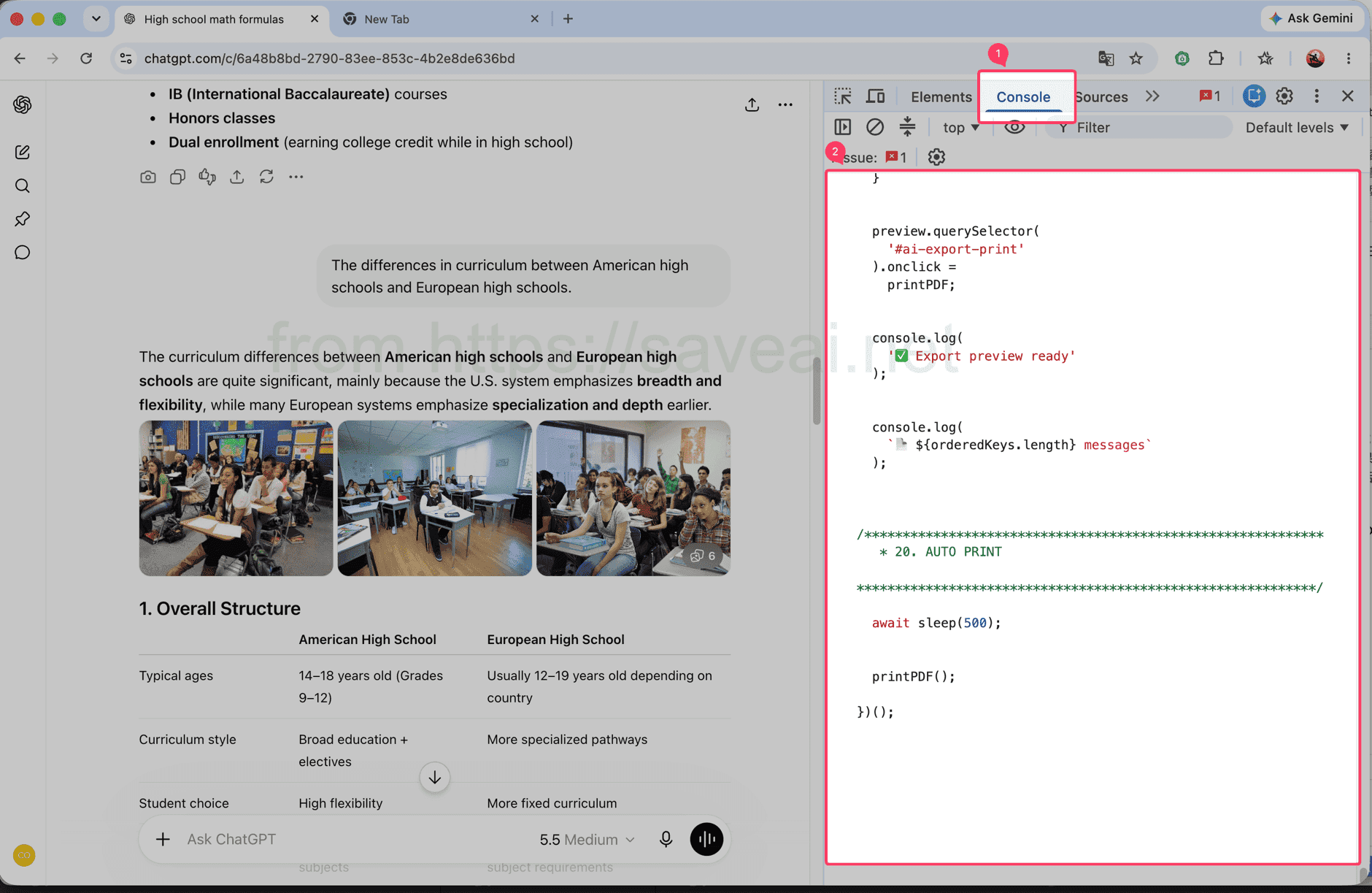
開啟 Console 分頁,將指令碼貼到標示的區域。
步驟二:複製並執行指令碼
點擊程式碼區塊右上角的 複製 按鈕,回到 Chrome Console 貼上指令碼,再按下 Enter。
// Load and print a complete ChatGPT conversation.
(async () => {
/************************************************************
* CONFIG
************************************************************/
const MESSAGE_SELECTOR = 'section .text-base';
// 每次向上滚动多少个 viewport
const STEP_RATIO = 1.2;
// 每次滚动后的等待时间
const SCROLL_WAIT = 180;
// 到顶部以后等待历史消息加载
const TOP_WAIT = 500;
// 连续几次顶部无变化后结束
const TOP_STABLE_LIMIT = 3;
const sleep = ms =>
new Promise(resolve => setTimeout(resolve, ms));
console.log('🚀 AI Chat Print started');
/************************************************************
* 1. FIND SCROLL CONTAINER
************************************************************/
function findScrollContainer() {
const firstMessage =
document.querySelector(MESSAGE_SELECTOR);
if (firstMessage) {
let el =
firstMessage.parentElement;
while (
el &&
el !== document.body
) {
const style =
getComputedStyle(el);
const scrollable =
el.scrollHeight >
el.clientHeight + 10 &&
(
style.overflowY === 'auto' ||
style.overflowY === 'scroll'
);
if (scrollable) {
return el;
}
el =
el.parentElement;
}
}
const candidates =
[...document.querySelectorAll('*')]
.filter(el => {
const style =
getComputedStyle(el);
return (
el.scrollHeight >
el.clientHeight + 10 &&
(
style.overflowY === 'auto' ||
style.overflowY === 'scroll'
)
);
})
.sort(
(a, b) =>
b.scrollHeight -
a.scrollHeight
);
return (
candidates[0] ||
document.scrollingElement ||
document.documentElement
);
}
const scrollContainer =
findScrollContainer();
console.log(
'📜 Scroll container:',
scrollContainer
);
/************************************************************
* 2. DATA
************************************************************/
const messageMap =
new Map();
const edges =
new Map();
const firstSeenStep =
new Map();
let scanStep = 0;
/************************************************************
* 3. HASH
************************************************************/
function hashString(str) {
let hash =
2166136261;
for (
let i = 0;
i < str.length;
i++
) {
hash ^=
str.charCodeAt(i);
hash =
Math.imul(
hash,
16777619
);
}
return (
hash >>> 0
).toString(36);
}
/************************************************************
* 4. MESSAGE KEY
************************************************************/
function getMessageKey(node) {
const section =
node.closest('section');
const candidates =
[
node,
section
].filter(Boolean);
const attrs = [
'data-message-id',
'data-turn-id',
'data-id',
'id'
];
for (
const el of candidates
) {
for (
const attr of attrs
) {
const value =
el.getAttribute?.(attr);
if (value) {
return (
`${attr}:${value}`
);
}
}
}
const text =
node.innerText || '';
const html =
node.innerHTML || '';
return (
'hash:' +
hashString(
text +
'\n---HTML---\n' +
html
)
);
}
/************************************************************
* 5. COLLECT CURRENT DOM
************************************************************/
function collect() {
const nodes =
[
...document.querySelectorAll(
MESSAGE_SELECTOR
)
];
const keys = [];
for (
const node of nodes
) {
const key =
getMessageKey(node);
keys.push(key);
if (
!messageMap.has(key)
) {
messageMap.set(
key,
node.cloneNode(true)
);
firstSeenStep.set(
key,
scanStep
);
}
}
/**
* 保存当前 DOM 中观察到的顺序:
*
* A -> B
* B -> C
*/
for (
let i = 0;
i < keys.length - 1;
i++
) {
const a =
keys[i];
const b =
keys[i + 1];
if (
a === b
) {
continue;
}
if (
!edges.has(a)
) {
edges.set(
a,
new Set()
);
}
edges
.get(a)
.add(b);
}
console.log(
`📦 step=${scanStep}`,
`DOM=${nodes.length}`,
`total=${messageMap.size}`
);
return {
nodes,
keys
};
}
/************************************************************
* 6. SCROLL TO BOTTOM FIRST
************************************************************/
async function scrollToBottomFully() {
console.log(
'⬇️ Scrolling to bottom...'
);
let stable = 0;
let lastTop = -1;
let rounds = 0;
while (
stable < 3 &&
rounds < 30
) {
rounds++;
scrollContainer.scrollTop =
scrollContainer.scrollHeight;
await sleep(250);
const now =
scrollContainer.scrollTop;
const max =
Math.max(
0,
scrollContainer.scrollHeight -
scrollContainer.clientHeight
);
if (
Math.abs(
now - lastTop
) < 2 &&
Math.abs(
max - now
) < 3
) {
stable++;
} else {
stable = 0;
}
lastTop =
now;
}
console.log(
'✅ Bottom reached'
);
}
/************************************************************
* 7. SCAN FROM BOTTOM TO TOP
************************************************************/
async function scanFromBottomToTop() {
console.log(
'⬆️ Scanning upward...'
);
let topStable = 0;
let safety = 0;
while (
topStable <
TOP_STABLE_LIMIT &&
safety < 10000
) {
safety++;
scanStep++;
collect();
const before =
scrollContainer.scrollTop;
/**
* 还没到顶部
*/
if (
before > 1
) {
const distance =
Math.max(
300,
scrollContainer.clientHeight *
STEP_RATIO
);
scrollContainer.scrollTop =
Math.max(
0,
before - distance
);
await sleep(
SCROLL_WAIT
);
collect();
topStable = 0;
continue;
}
/**
* 已经到顶部
*
* 等待网站继续加载更早消息
*/
const oldHeight =
scrollContainer.scrollHeight;
const oldTotal =
messageMap.size;
await sleep(
TOP_WAIT
);
scanStep++;
collect();
const newHeight =
scrollContainer.scrollHeight;
const newTotal =
messageMap.size;
if (
newTotal > oldTotal ||
newHeight >
oldHeight + 5 ||
scrollContainer.scrollTop > 1
) {
topStable = 0;
console.log(
'➕ Older messages loaded:',
newTotal
);
} else {
topStable++;
console.log(
`⏳ Top stable ${topStable}/${TOP_STABLE_LIMIT}`
);
}
}
collect();
console.log(
'✅ Scan complete:',
messageMap.size
);
}
/************************************************************
* 8. FINAL ORDER
************************************************************/
function getFinalOrder() {
/**
* 最优情况:
*
* 扫描结束后页面已经把全部消息留在 DOM 中。
*
* 这种情况下直接相信当前 DOM 顺序,
* 不再自己排序。
*/
const finalNodes =
[
...document.querySelectorAll(
MESSAGE_SELECTOR
)
];
const finalKeys =
finalNodes.map(
getMessageKey
);
const finalKeySet =
new Set(finalKeys);
const allCollectedPresent =
[...messageMap.keys()]
.every(
key =>
finalKeySet.has(key)
);
if (
allCollectedPresent &&
finalKeys.length
) {
console.log(
'🎯 Using final DOM order'
);
const seen =
new Set();
return finalKeys.filter(
key => {
if (
seen.has(key)
) {
return false;
}
seen.add(key);
return true;
}
);
}
/**
* fallback:
*
* 如果还是严格虚拟滚动,
* 根据之前记录的局部 DOM 顺序重建。
*/
console.log(
'🧩 Rebuilding virtual list order'
);
const allKeys =
[...messageMap.keys()];
const indegree =
new Map();
allKeys.forEach(
key =>
indegree.set(
key,
0
)
);
edges.forEach(
(targets, from) => {
targets.forEach(
to => {
if (
indegree.has(to) &&
from !== to
) {
indegree.set(
to,
indegree.get(to) + 1
);
}
}
);
}
);
let queue =
allKeys.filter(
key =>
indegree.get(key) === 0
);
/**
* 因为是从底部往顶部扫描,
* 越晚第一次看到的消息通常越靠前。
*/
queue.sort(
(a, b) =>
(
firstSeenStep.get(b) || 0
) -
(
firstSeenStep.get(a) || 0
)
);
const result = [];
while (
queue.length
) {
const key =
queue.shift();
result.push(key);
const targets =
edges.get(key);
if (
!targets
) {
continue;
}
for (
const to of targets
) {
if (
!indegree.has(to)
) {
continue;
}
indegree.set(
to,
indegree.get(to) - 1
);
if (
indegree.get(to) === 0
) {
queue.push(to);
queue.sort(
(a, b) =>
(
firstSeenStep.get(b) || 0
) -
(
firstSeenStep.get(a) || 0
)
);
}
}
}
/**
* 防止异常关系导致遗漏
*/
const used =
new Set(result);
for (
const key of allKeys
) {
if (
!used.has(key)
) {
result.push(key);
}
}
return result;
}
/************************************************************
* 9. START
************************************************************/
await scrollToBottomFully();
scanStep++;
collect();
await scanFromBottomToTop();
const orderedKeys =
getFinalOrder();
console.log(
'📚 Final messages:',
orderedKeys.length
);
/************************************************************
* 10. CLEAN OLD PREVIEW
************************************************************/
document
.querySelector(
'#ai-export-preview'
)
?.remove();
document
.querySelector(
'#ai-export-print-style'
)
?.remove();
/************************************************************
* 11. CREATE PREVIEW
************************************************************/
const preview =
document.createElement(
'div'
);
preview.id =
'ai-export-preview';
preview.innerHTML = `
<div id="ai-export-toolbar">
<button id="ai-export-close">
Close
</button>
<button id="ai-export-print">
Print PDF
</button>
<span id="ai-export-count">
</span>
</div>
<div id="ai-export-content">
</div>
`;
preview.style.cssText = `
position: fixed;
inset: 0;
z-index: 2147483647;
overflow-y: auto;
overflow-x: hidden;
background: white;
padding: 0;
`;
/************************************************************
* 12. TOOLBAR
************************************************************/
const toolbar =
preview.querySelector(
'#ai-export-toolbar'
);
toolbar.style.cssText = `
position: sticky;
top: 0;
z-index: 9999;
display: flex;
align-items: center;
gap: 10px;
padding: 12px 20px;
background: white;
border-bottom:
1px solid rgba(0,0,0,.15);
`;
toolbar
.querySelectorAll(
'button'
)
.forEach(
button => {
button.style.cssText = `
padding: 7px 14px;
cursor: pointer;
border:
1px solid #aaa;
border-radius: 6px;
background: white;
color: black;
`;
}
);
/************************************************************
* 13. CONTENT
************************************************************/
const content =
preview.querySelector(
'#ai-export-content'
);
content.style.cssText = `
width: 100%;
max-width: 1000px;
margin: 0 auto;
padding:
30px 40px 80px;
box-sizing:
border-box;
`;
/************************************************************
* 14. AI EXPORTER BANNER
*
* 只在当前页面显示。
* 打印 PDF 时隐藏。
************************************************************/
const lang =
(
navigator.language ||
'en'
)
.replace(
'_',
'-'
);
const aiExporterUrl =
'https://chromewebstore.google.com/detail/' +
'ai-exporter-save-chatgpt/' +
'kagjkiiecagemklhmhkabbalfpbianbe' +
`?hl=${encodeURIComponent(lang)}` +
'&utm_source=chatgptprint';
const promotion =
document.createElement(
'div'
);
promotion.id =
'ai-export-promotion';
promotion.innerHTML = `
<div class="ai-export-promo-main">
<div class="ai-export-promo-badge">
AI Exporter
</div>
<div class="ai-export-promo-text">
<div class="ai-export-promo-title">
Export ChatGPT to PDF with AI Exporter
</div>
<div class="ai-export-promo-description">
PDF, Word, Markdown and more.
</div>
</div>
<a
class="ai-export-promo-button"
href="${aiExporterUrl}"
target="_blank"
rel="noopener noreferrer"
>
Get AI Exporter →
</a>
</div>
`;
promotion.style.cssText = `
margin:
0 auto 34px;
padding:
18px 20px;
max-width:
920px;
box-sizing:
border-box;
border:
1px solid rgba(59,130,246,.25);
border-radius:
14px;
background:
linear-gradient(
135deg,
#eff6ff 0%,
#eef2ff 52%,
#f5f3ff 100%
);
color:
#172554;
box-shadow:
0 6px 22px
rgba(59,130,246,.10);
font-family:
-apple-system,
BlinkMacSystemFont,
"Segoe UI",
sans-serif;
`;
const promoMain =
promotion.querySelector(
'.ai-export-promo-main'
);
promoMain.style.cssText = `
display: flex;
align-items: center;
gap: 16px;
`;
const badge =
promotion.querySelector(
'.ai-export-promo-badge'
);
badge.style.cssText = `
flex:
0 0 auto;
padding:
7px 10px;
border-radius:
8px;
background:
#2563eb;
color:
white;
font-size:
13px;
line-height:
1;
font-weight:
700;
letter-spacing:
.2px;
`;
const promoText =
promotion.querySelector(
'.ai-export-promo-text'
);
promoText.style.cssText = `
flex:
1 1 auto;
min-width:
0;
`;
const promoTitle =
promotion.querySelector(
'.ai-export-promo-title'
);
promoTitle.style.cssText = `
margin-bottom:
4px;
font-size:
16px;
line-height:
1.45;
font-weight:
700;
color:
#172554;
`;
const promoDescription =
promotion.querySelector(
'.ai-export-promo-description'
);
promoDescription.style.cssText = `
font-size:
13px;
line-height:
1.5;
color:
#475569;
`;
const promoButton =
promotion.querySelector(
'.ai-export-promo-button'
);
promoButton.style.cssText = `
flex:
0 0 auto;
padding:
9px 13px;
border-radius:
8px;
background:
#2563eb;
color:
white;
font-size:
13px;
line-height:
1.2;
font-weight:
600;
text-decoration:
none;
white-space:
nowrap;
`;
/**
* 广告放在所有对话最上方
*/
content.appendChild(
promotion
);
/************************************************************
* 15. APPEND MESSAGES
************************************************************/
for (
const key of orderedKeys
) {
const node =
messageMap.get(key);
if (
!node
) {
continue;
}
content.appendChild(
node.cloneNode(true)
);
}
/************************************************************
* 16. MESSAGE COUNT
************************************************************/
preview.querySelector(
'#ai-export-count'
).textContent =
`${orderedKeys.length} messages`;
document.body.appendChild(
preview
);
/************************************************************
* 17. PRINT CSS
************************************************************/
const printStyle =
document.createElement(
'style'
);
printStyle.id =
'ai-export-print-style';
printStyle.textContent = `
@media print {
html,
body {
width:
auto !important;
height:
auto !important;
min-height:
0 !important;
max-height:
none !important;
overflow:
visible !important;
}
body > *:not(#ai-export-preview) {
display:
none !important;
}
#ai-export-preview {
display:
block !important;
position:
static !important;
inset:
auto !important;
width:
100% !important;
height:
auto !important;
min-height:
0 !important;
max-height:
none !important;
overflow:
visible !important;
padding:
0 !important;
margin:
0 !important;
background:
white !important;
}
#ai-export-toolbar {
display:
none !important;
}
/******************************************************
* PDF 中隐藏 AI Exporter 推荐
******************************************************/
#ai-export-promotion {
display:
none !important;
}
#ai-export-content {
display:
block !important;
position:
static !important;
width:
100% !important;
max-width:
none !important;
height:
auto !important;
min-height:
0 !important;
max-height:
none !important;
overflow:
visible !important;
margin:
0 !important;
padding:
0 !important;
}
#ai-export-content > * {
overflow:
visible !important;
max-height:
none !important;
}
}
`;
document.head.appendChild(
printStyle
);
/************************************************************
* 18. CLOSE
************************************************************/
preview.querySelector(
'#ai-export-close'
).onclick = () => {
preview.remove();
printStyle.remove();
console.log(
'✅ Preview closed'
);
};
/************************************************************
* 19. PRINT
************************************************************/
function printPDF() {
console.log(
'🖨️ Opening print dialog...'
);
/**
* 强制完成 layout
*/
preview.offsetHeight;
requestAnimationFrame(
() => {
requestAnimationFrame(
() => {
window.print();
}
);
}
);
}
preview.querySelector(
'#ai-export-print'
).onclick =
printPDF;
console.log(
'✅ Export preview ready'
);
console.log(
`📄 ${orderedKeys.length} messages`
);
/************************************************************
* 20. AUTO PRINT
************************************************************/
await sleep(500);
printPDF();
})();指令碼內容較長,建議直接使用複製按鈕,不要手動拖曳選取。
只在瀏覽器 Console 執行你信任的程式碼,並確認你有權存取及處理目前的對話。
步驟三:等待列印視窗開啟
指令碼執行期間不要關閉 ChatGPT 分頁。它會自動捲動對話,Console 也會持續顯示目前已收集的訊息數量。對話越長,等待時間越久;掃描完成後,Chrome 會自動開啟列印視窗。
若要印在紙張上,請選擇對應的印表機;若要儲存檔案,請在「目的地」選擇 Save as PDF,再點擊 Save。
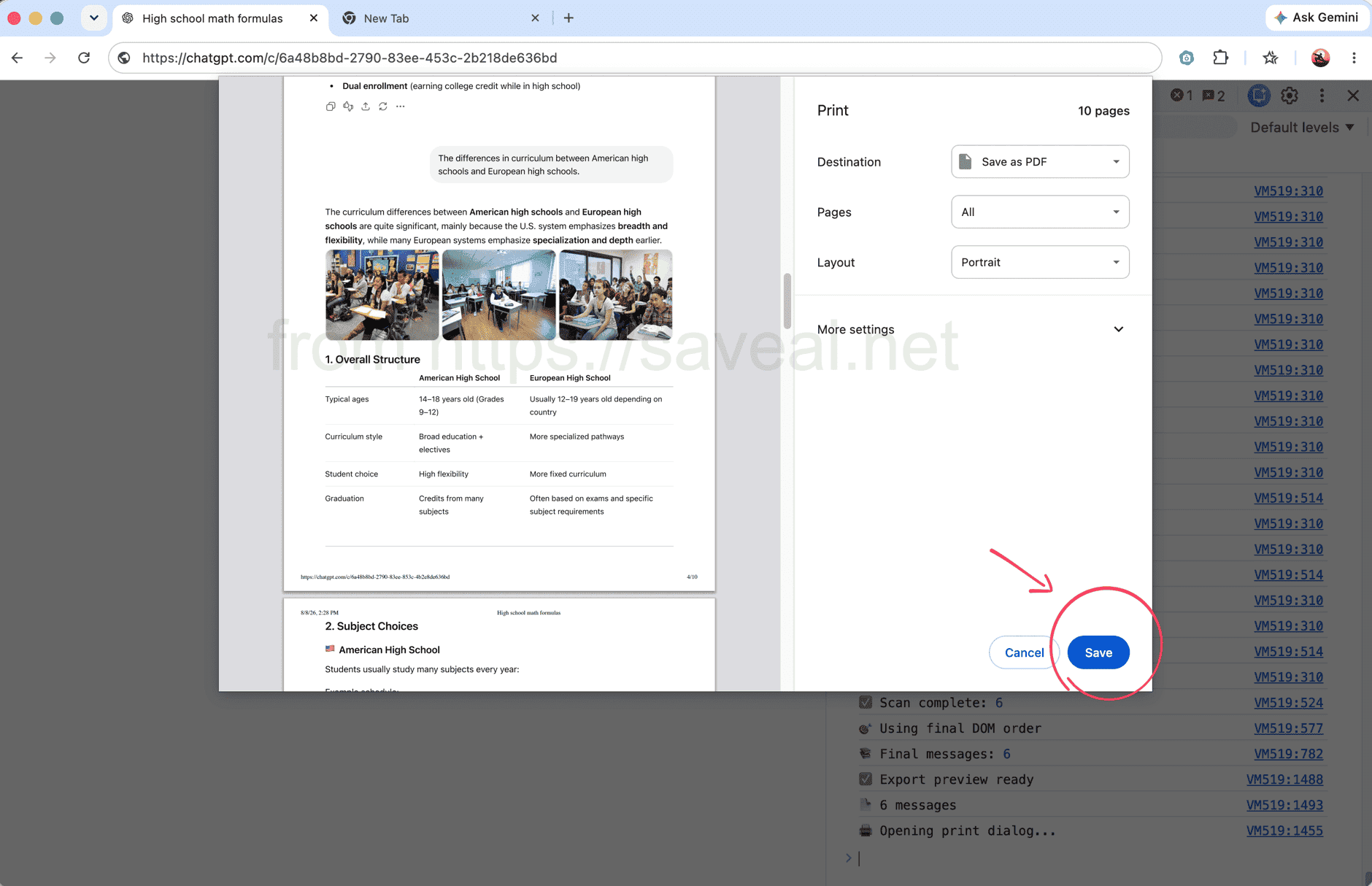
指令碼執行時,Console 會顯示訊息數量;掃描完成後會自動開啟列印視窗。
方法二:使用瀏覽器擴充功能匯出完整對話
如果不想使用開發人員工具,可以透過 AI Exporter 更快完成。開啟 ChatGPT 對話,點擊 Chrome 工具列中的 AI Exporter 圖示,再從彈出視窗選擇 PDF,擴充功能就會載入完整對話並儲存為 PDF。
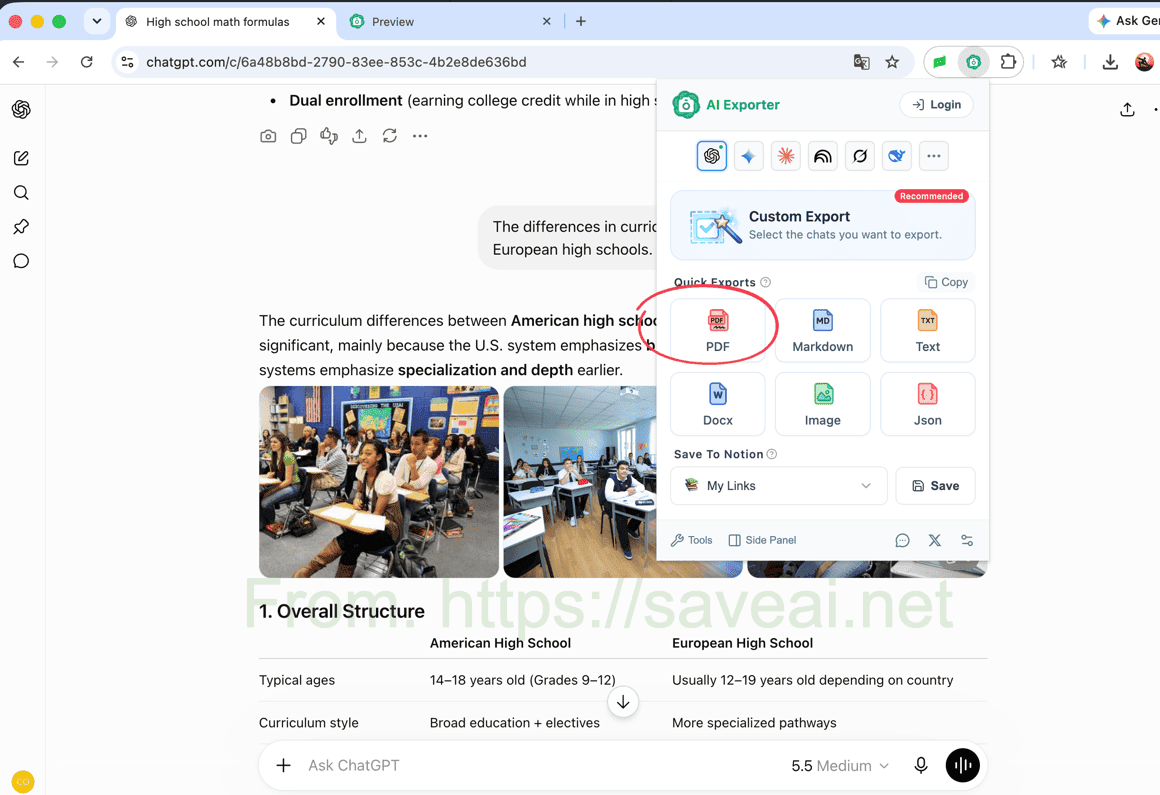
點擊擴充功能圖示開啟視窗,再選擇 PDF,即可儲存整段對話。
這個方法需要先安裝瀏覽器擴充功能,但更適合重複匯出,也能直接保留程式碼區塊、表格、圖片和公式。如果不需要整段對話,也可以只選擇其中的重要訊息。
兩種方法該怎麼選?
| 你的情況 | 較適合的方法 |
|---|---|
| 只列印一次,不想安裝任何東西 | Console 指令碼 |
| 熟悉 Chrome 開發人員工具 | Console 指令碼 |
| 經常儲存 ChatGPT 對話 | 瀏覽器擴充功能 |
| 需要保留程式碼、表格、公式、圖片或調整 PDF 設定 | 瀏覽器擴充功能 |
臨時列印一次,可以先用指令碼;如果經常匯出,或更重視 PDF 排版,瀏覽器擴充功能會比較省事。
本文由 Colin 原創撰寫。如需轉載,請在轉載內容中註明本文連結為原始來源。