
Wie drucke ich einen vollständigen ChatGPT-Chat?
Beim Drucken langer ChatGPT-Chats können Nachrichten fehlen. Mit diesem Konsolen-Skript drucken Sie die gesamte Unterhaltung oder speichern sie als PDF.
Wenn Strg + P nur einen Teil Ihres ChatGPT-Chats druckt, liegt das meist nicht am Drucker. ChatGPT hat möglicherweise nicht alle Nachrichten gleichzeitig in die Seite geladen.
Sie haben zwei Möglichkeiten:
- Ohne Installation: Führen Sie das Skript unten aus und drucken Sie anschließend den vollständig geladenen Chat oder speichern Sie ihn als PDF.
- Für regelmäßige Exporte: Nutzen Sie eine Browser-Erweiterung, um den gesamten Chat direkt als PDF zu speichern.
Warum wird ein ChatGPT-Chat nur teilweise gedruckt?
Bei der Untersuchung des ChatGPT-DOM zeigt sich, dass lange Chats virtuell gerendert werden. Beim Scrollen lädt ChatGPT die gerade benötigten Nachrichten und kann Inhalte außerhalb des sichtbaren Bereichs aus der Seite entfernen. Das hält lange Chats flüssig, der Browser kann jedoch nur Inhalte drucken, die sich zu diesem Zeitpunkt im DOM befinden.
Das folgende Skript scrollt automatisch durch den Chat, sammelt alle Nachrichten und öffnet erst danach den Druckdialog.
Methode 1: Den vollständigen Chat per Skript drucken
Diese Methode eignet sich, wenn Sie nur einen Chat drucken und keine Erweiterung installieren möchten.
Schritt 1: Chrome-Konsole öffnen
Öffnen Sie den gewünschten ChatGPT-Chat und anschließend die Chrome-Entwicklertools:
- Mac:
Command + Option + J - Windows oder Linux:
Strg + Umschalt + J
Wechseln Sie zum Tab Console. Das Skript wird in den unten markierten freien Bereich eingefügt.
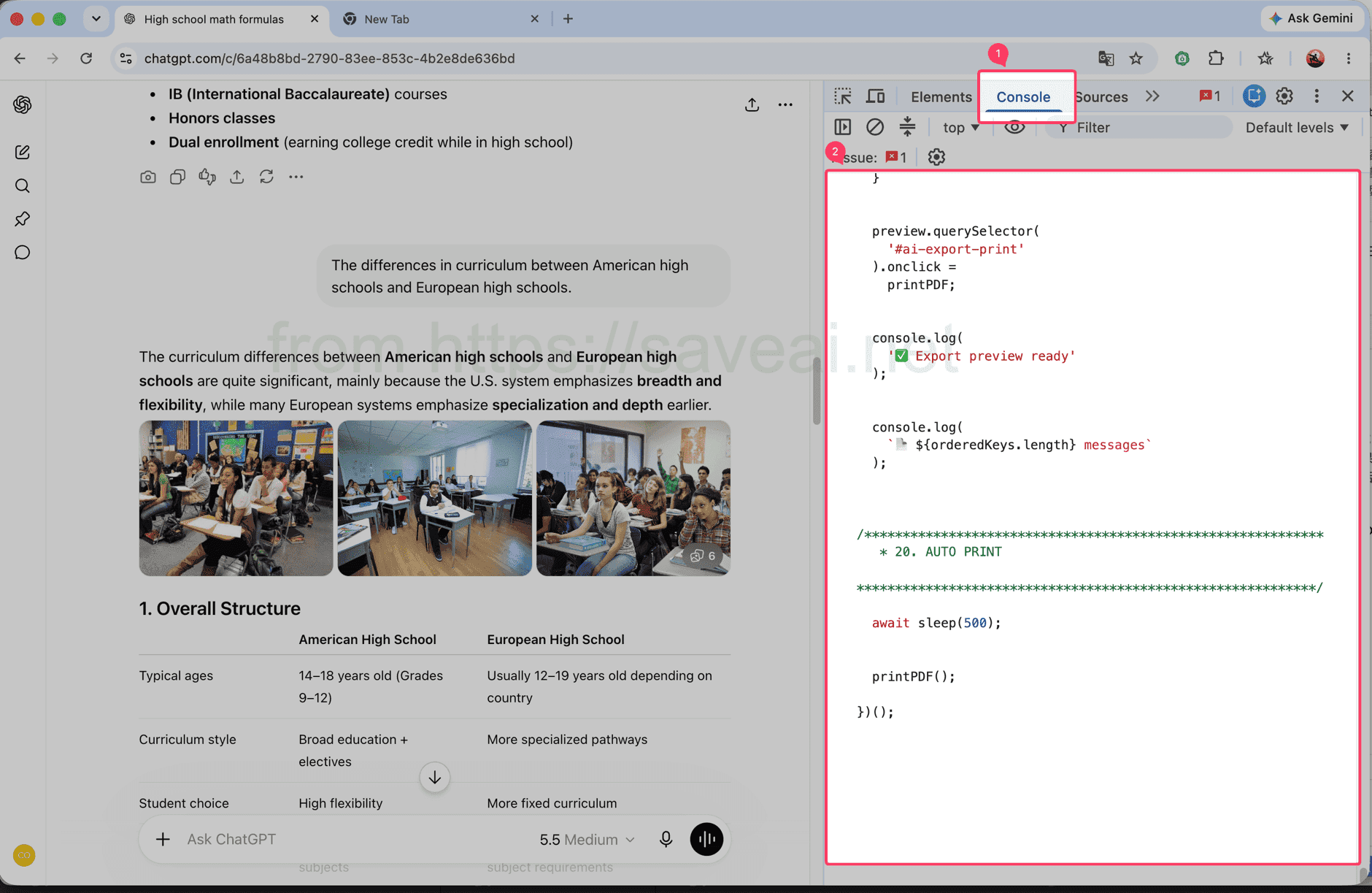
Öffnen Sie den Console-Tab und fügen Sie das Skript in den markierten Bereich ein.
Schritt 2: Skript kopieren und ausführen
Klicken Sie oben rechts im Codefeld auf Kopieren, fügen Sie das Skript in die Chrome-Konsole ein und drücken Sie Enter.
// Load and print a complete ChatGPT conversation.
(async () => {
/************************************************************
* CONFIG
************************************************************/
const MESSAGE_SELECTOR = 'section .text-base';
// 每次向上滚动多少个 viewport
const STEP_RATIO = 1.2;
// 每次滚动后的等待时间
const SCROLL_WAIT = 180;
// 到顶部以后等待历史消息加载
const TOP_WAIT = 500;
// 连续几次顶部无变化后结束
const TOP_STABLE_LIMIT = 3;
const sleep = ms =>
new Promise(resolve => setTimeout(resolve, ms));
console.log('🚀 AI Chat Print started');
/************************************************************
* 1. FIND SCROLL CONTAINER
************************************************************/
function findScrollContainer() {
const firstMessage =
document.querySelector(MESSAGE_SELECTOR);
if (firstMessage) {
let el =
firstMessage.parentElement;
while (
el &&
el !== document.body
) {
const style =
getComputedStyle(el);
const scrollable =
el.scrollHeight >
el.clientHeight + 10 &&
(
style.overflowY === 'auto' ||
style.overflowY === 'scroll'
);
if (scrollable) {
return el;
}
el =
el.parentElement;
}
}
const candidates =
[...document.querySelectorAll('*')]
.filter(el => {
const style =
getComputedStyle(el);
return (
el.scrollHeight >
el.clientHeight + 10 &&
(
style.overflowY === 'auto' ||
style.overflowY === 'scroll'
)
);
})
.sort(
(a, b) =>
b.scrollHeight -
a.scrollHeight
);
return (
candidates[0] ||
document.scrollingElement ||
document.documentElement
);
}
const scrollContainer =
findScrollContainer();
console.log(
'📜 Scroll container:',
scrollContainer
);
/************************************************************
* 2. DATA
************************************************************/
const messageMap =
new Map();
const edges =
new Map();
const firstSeenStep =
new Map();
let scanStep = 0;
/************************************************************
* 3. HASH
************************************************************/
function hashString(str) {
let hash =
2166136261;
for (
let i = 0;
i < str.length;
i++
) {
hash ^=
str.charCodeAt(i);
hash =
Math.imul(
hash,
16777619
);
}
return (
hash >>> 0
).toString(36);
}
/************************************************************
* 4. MESSAGE KEY
************************************************************/
function getMessageKey(node) {
const section =
node.closest('section');
const candidates =
[
node,
section
].filter(Boolean);
const attrs = [
'data-message-id',
'data-turn-id',
'data-id',
'id'
];
for (
const el of candidates
) {
for (
const attr of attrs
) {
const value =
el.getAttribute?.(attr);
if (value) {
return (
`${attr}:${value}`
);
}
}
}
const text =
node.innerText || '';
const html =
node.innerHTML || '';
return (
'hash:' +
hashString(
text +
'\n---HTML---\n' +
html
)
);
}
/************************************************************
* 5. COLLECT CURRENT DOM
************************************************************/
function collect() {
const nodes =
[
...document.querySelectorAll(
MESSAGE_SELECTOR
)
];
const keys = [];
for (
const node of nodes
) {
const key =
getMessageKey(node);
keys.push(key);
if (
!messageMap.has(key)
) {
messageMap.set(
key,
node.cloneNode(true)
);
firstSeenStep.set(
key,
scanStep
);
}
}
/**
* 保存当前 DOM 中观察到的顺序:
*
* A -> B
* B -> C
*/
for (
let i = 0;
i < keys.length - 1;
i++
) {
const a =
keys[i];
const b =
keys[i + 1];
if (
a === b
) {
continue;
}
if (
!edges.has(a)
) {
edges.set(
a,
new Set()
);
}
edges
.get(a)
.add(b);
}
console.log(
`📦 step=${scanStep}`,
`DOM=${nodes.length}`,
`total=${messageMap.size}`
);
return {
nodes,
keys
};
}
/************************************************************
* 6. SCROLL TO BOTTOM FIRST
************************************************************/
async function scrollToBottomFully() {
console.log(
'⬇️ Scrolling to bottom...'
);
let stable = 0;
let lastTop = -1;
let rounds = 0;
while (
stable < 3 &&
rounds < 30
) {
rounds++;
scrollContainer.scrollTop =
scrollContainer.scrollHeight;
await sleep(250);
const now =
scrollContainer.scrollTop;
const max =
Math.max(
0,
scrollContainer.scrollHeight -
scrollContainer.clientHeight
);
if (
Math.abs(
now - lastTop
) < 2 &&
Math.abs(
max - now
) < 3
) {
stable++;
} else {
stable = 0;
}
lastTop =
now;
}
console.log(
'✅ Bottom reached'
);
}
/************************************************************
* 7. SCAN FROM BOTTOM TO TOP
************************************************************/
async function scanFromBottomToTop() {
console.log(
'⬆️ Scanning upward...'
);
let topStable = 0;
let safety = 0;
while (
topStable <
TOP_STABLE_LIMIT &&
safety < 10000
) {
safety++;
scanStep++;
collect();
const before =
scrollContainer.scrollTop;
/**
* 还没到顶部
*/
if (
before > 1
) {
const distance =
Math.max(
300,
scrollContainer.clientHeight *
STEP_RATIO
);
scrollContainer.scrollTop =
Math.max(
0,
before - distance
);
await sleep(
SCROLL_WAIT
);
collect();
topStable = 0;
continue;
}
/**
* 已经到顶部
*
* 等待网站继续加载更早消息
*/
const oldHeight =
scrollContainer.scrollHeight;
const oldTotal =
messageMap.size;
await sleep(
TOP_WAIT
);
scanStep++;
collect();
const newHeight =
scrollContainer.scrollHeight;
const newTotal =
messageMap.size;
if (
newTotal > oldTotal ||
newHeight >
oldHeight + 5 ||
scrollContainer.scrollTop > 1
) {
topStable = 0;
console.log(
'➕ Older messages loaded:',
newTotal
);
} else {
topStable++;
console.log(
`⏳ Top stable ${topStable}/${TOP_STABLE_LIMIT}`
);
}
}
collect();
console.log(
'✅ Scan complete:',
messageMap.size
);
}
/************************************************************
* 8. FINAL ORDER
************************************************************/
function getFinalOrder() {
/**
* 最优情况:
*
* 扫描结束后页面已经把全部消息留在 DOM 中。
*
* 这种情况下直接相信当前 DOM 顺序,
* 不再自己排序。
*/
const finalNodes =
[
...document.querySelectorAll(
MESSAGE_SELECTOR
)
];
const finalKeys =
finalNodes.map(
getMessageKey
);
const finalKeySet =
new Set(finalKeys);
const allCollectedPresent =
[...messageMap.keys()]
.every(
key =>
finalKeySet.has(key)
);
if (
allCollectedPresent &&
finalKeys.length
) {
console.log(
'🎯 Using final DOM order'
);
const seen =
new Set();
return finalKeys.filter(
key => {
if (
seen.has(key)
) {
return false;
}
seen.add(key);
return true;
}
);
}
/**
* fallback:
*
* 如果还是严格虚拟滚动,
* 根据之前记录的局部 DOM 顺序重建。
*/
console.log(
'🧩 Rebuilding virtual list order'
);
const allKeys =
[...messageMap.keys()];
const indegree =
new Map();
allKeys.forEach(
key =>
indegree.set(
key,
0
)
);
edges.forEach(
(targets, from) => {
targets.forEach(
to => {
if (
indegree.has(to) &&
from !== to
) {
indegree.set(
to,
indegree.get(to) + 1
);
}
}
);
}
);
let queue =
allKeys.filter(
key =>
indegree.get(key) === 0
);
/**
* 因为是从底部往顶部扫描,
* 越晚第一次看到的消息通常越靠前。
*/
queue.sort(
(a, b) =>
(
firstSeenStep.get(b) || 0
) -
(
firstSeenStep.get(a) || 0
)
);
const result = [];
while (
queue.length
) {
const key =
queue.shift();
result.push(key);
const targets =
edges.get(key);
if (
!targets
) {
continue;
}
for (
const to of targets
) {
if (
!indegree.has(to)
) {
continue;
}
indegree.set(
to,
indegree.get(to) - 1
);
if (
indegree.get(to) === 0
) {
queue.push(to);
queue.sort(
(a, b) =>
(
firstSeenStep.get(b) || 0
) -
(
firstSeenStep.get(a) || 0
)
);
}
}
}
/**
* 防止异常关系导致遗漏
*/
const used =
new Set(result);
for (
const key of allKeys
) {
if (
!used.has(key)
) {
result.push(key);
}
}
return result;
}
/************************************************************
* 9. START
************************************************************/
await scrollToBottomFully();
scanStep++;
collect();
await scanFromBottomToTop();
const orderedKeys =
getFinalOrder();
console.log(
'📚 Final messages:',
orderedKeys.length
);
/************************************************************
* 10. CLEAN OLD PREVIEW
************************************************************/
document
.querySelector(
'#ai-export-preview'
)
?.remove();
document
.querySelector(
'#ai-export-print-style'
)
?.remove();
/************************************************************
* 11. CREATE PREVIEW
************************************************************/
const preview =
document.createElement(
'div'
);
preview.id =
'ai-export-preview';
preview.innerHTML = `
<div id="ai-export-toolbar">
<button id="ai-export-close">
Close
</button>
<button id="ai-export-print">
Print PDF
</button>
<span id="ai-export-count">
</span>
</div>
<div id="ai-export-content">
</div>
`;
preview.style.cssText = `
position: fixed;
inset: 0;
z-index: 2147483647;
overflow-y: auto;
overflow-x: hidden;
background: white;
padding: 0;
`;
/************************************************************
* 12. TOOLBAR
************************************************************/
const toolbar =
preview.querySelector(
'#ai-export-toolbar'
);
toolbar.style.cssText = `
position: sticky;
top: 0;
z-index: 9999;
display: flex;
align-items: center;
gap: 10px;
padding: 12px 20px;
background: white;
border-bottom:
1px solid rgba(0,0,0,.15);
`;
toolbar
.querySelectorAll(
'button'
)
.forEach(
button => {
button.style.cssText = `
padding: 7px 14px;
cursor: pointer;
border:
1px solid #aaa;
border-radius: 6px;
background: white;
color: black;
`;
}
);
/************************************************************
* 13. CONTENT
************************************************************/
const content =
preview.querySelector(
'#ai-export-content'
);
content.style.cssText = `
width: 100%;
max-width: 1000px;
margin: 0 auto;
padding:
30px 40px 80px;
box-sizing:
border-box;
`;
/************************************************************
* 14. AI EXPORTER BANNER
*
* 只在当前页面显示。
* 打印 PDF 时隐藏。
************************************************************/
const lang =
(
navigator.language ||
'en'
)
.replace(
'_',
'-'
);
const aiExporterUrl =
'https://chromewebstore.google.com/detail/' +
'ai-exporter-save-chatgpt/' +
'kagjkiiecagemklhmhkabbalfpbianbe' +
`?hl=${encodeURIComponent(lang)}` +
'&utm_source=chatgptprint';
const promotion =
document.createElement(
'div'
);
promotion.id =
'ai-export-promotion';
promotion.innerHTML = `
<div class="ai-export-promo-main">
<div class="ai-export-promo-badge">
AI Exporter
</div>
<div class="ai-export-promo-text">
<div class="ai-export-promo-title">
Export ChatGPT to PDF with AI Exporter
</div>
<div class="ai-export-promo-description">
PDF, Word, Markdown and more.
</div>
</div>
<a
class="ai-export-promo-button"
href="${aiExporterUrl}"
target="_blank"
rel="noopener noreferrer"
>
Get AI Exporter →
</a>
</div>
`;
promotion.style.cssText = `
margin:
0 auto 34px;
padding:
18px 20px;
max-width:
920px;
box-sizing:
border-box;
border:
1px solid rgba(59,130,246,.25);
border-radius:
14px;
background:
linear-gradient(
135deg,
#eff6ff 0%,
#eef2ff 52%,
#f5f3ff 100%
);
color:
#172554;
box-shadow:
0 6px 22px
rgba(59,130,246,.10);
font-family:
-apple-system,
BlinkMacSystemFont,
"Segoe UI",
sans-serif;
`;
const promoMain =
promotion.querySelector(
'.ai-export-promo-main'
);
promoMain.style.cssText = `
display: flex;
align-items: center;
gap: 16px;
`;
const badge =
promotion.querySelector(
'.ai-export-promo-badge'
);
badge.style.cssText = `
flex:
0 0 auto;
padding:
7px 10px;
border-radius:
8px;
background:
#2563eb;
color:
white;
font-size:
13px;
line-height:
1;
font-weight:
700;
letter-spacing:
.2px;
`;
const promoText =
promotion.querySelector(
'.ai-export-promo-text'
);
promoText.style.cssText = `
flex:
1 1 auto;
min-width:
0;
`;
const promoTitle =
promotion.querySelector(
'.ai-export-promo-title'
);
promoTitle.style.cssText = `
margin-bottom:
4px;
font-size:
16px;
line-height:
1.45;
font-weight:
700;
color:
#172554;
`;
const promoDescription =
promotion.querySelector(
'.ai-export-promo-description'
);
promoDescription.style.cssText = `
font-size:
13px;
line-height:
1.5;
color:
#475569;
`;
const promoButton =
promotion.querySelector(
'.ai-export-promo-button'
);
promoButton.style.cssText = `
flex:
0 0 auto;
padding:
9px 13px;
border-radius:
8px;
background:
#2563eb;
color:
white;
font-size:
13px;
line-height:
1.2;
font-weight:
600;
text-decoration:
none;
white-space:
nowrap;
`;
/**
* 广告放在所有对话最上方
*/
content.appendChild(
promotion
);
/************************************************************
* 15. APPEND MESSAGES
************************************************************/
for (
const key of orderedKeys
) {
const node =
messageMap.get(key);
if (
!node
) {
continue;
}
content.appendChild(
node.cloneNode(true)
);
}
/************************************************************
* 16. MESSAGE COUNT
************************************************************/
preview.querySelector(
'#ai-export-count'
).textContent =
`${orderedKeys.length} messages`;
document.body.appendChild(
preview
);
/************************************************************
* 17. PRINT CSS
************************************************************/
const printStyle =
document.createElement(
'style'
);
printStyle.id =
'ai-export-print-style';
printStyle.textContent = `
@media print {
html,
body {
width:
auto !important;
height:
auto !important;
min-height:
0 !important;
max-height:
none !important;
overflow:
visible !important;
}
body > *:not(#ai-export-preview) {
display:
none !important;
}
#ai-export-preview {
display:
block !important;
position:
static !important;
inset:
auto !important;
width:
100% !important;
height:
auto !important;
min-height:
0 !important;
max-height:
none !important;
overflow:
visible !important;
padding:
0 !important;
margin:
0 !important;
background:
white !important;
}
#ai-export-toolbar {
display:
none !important;
}
/******************************************************
* PDF 中隐藏 AI Exporter 推荐
******************************************************/
#ai-export-promotion {
display:
none !important;
}
#ai-export-content {
display:
block !important;
position:
static !important;
width:
100% !important;
max-width:
none !important;
height:
auto !important;
min-height:
0 !important;
max-height:
none !important;
overflow:
visible !important;
margin:
0 !important;
padding:
0 !important;
}
#ai-export-content > * {
overflow:
visible !important;
max-height:
none !important;
}
}
`;
document.head.appendChild(
printStyle
);
/************************************************************
* 18. CLOSE
************************************************************/
preview.querySelector(
'#ai-export-close'
).onclick = () => {
preview.remove();
printStyle.remove();
console.log(
'✅ Preview closed'
);
};
/************************************************************
* 19. PRINT
************************************************************/
function printPDF() {
console.log(
'🖨️ Opening print dialog...'
);
/**
* 强制完成 layout
*/
preview.offsetHeight;
requestAnimationFrame(
() => {
requestAnimationFrame(
() => {
window.print();
}
);
}
);
}
preview.querySelector(
'#ai-export-print'
).onclick =
printPDF;
console.log(
'✅ Export preview ready'
);
console.log(
`📄 ${orderedKeys.length} messages`
);
/************************************************************
* 20. AUTO PRINT
************************************************************/
await sleep(500);
printPDF();
})();Das Skript ist lang. Verwenden Sie deshalb die Schaltfläche, statt den Code manuell zu markieren.
Fügen Sie nur Code aus vertrauenswürdigen Quellen in die Browser-Konsole ein. Führen Sie das Skript ausschließlich bei Unterhaltungen aus, auf die Sie zugreifen dürfen.
Schritt 3: Auf den Druckdialog warten
Lassen Sie den ChatGPT-Tab geöffnet, während das Skript läuft. Es scrollt automatisch durch den Chat; die Konsole zeigt fortlaufend an, wie viele Nachrichten bereits erfasst wurden. Je länger der Chat, desto länger dauert der Vorgang. Nach Abschluss öffnet Chrome automatisch den Druckdialog.
Wählen Sie für einen Ausdruck Ihren Drucker. Für eine Datei wählen Sie unter „Ziel“ Als PDF speichern und klicken auf Speichern.
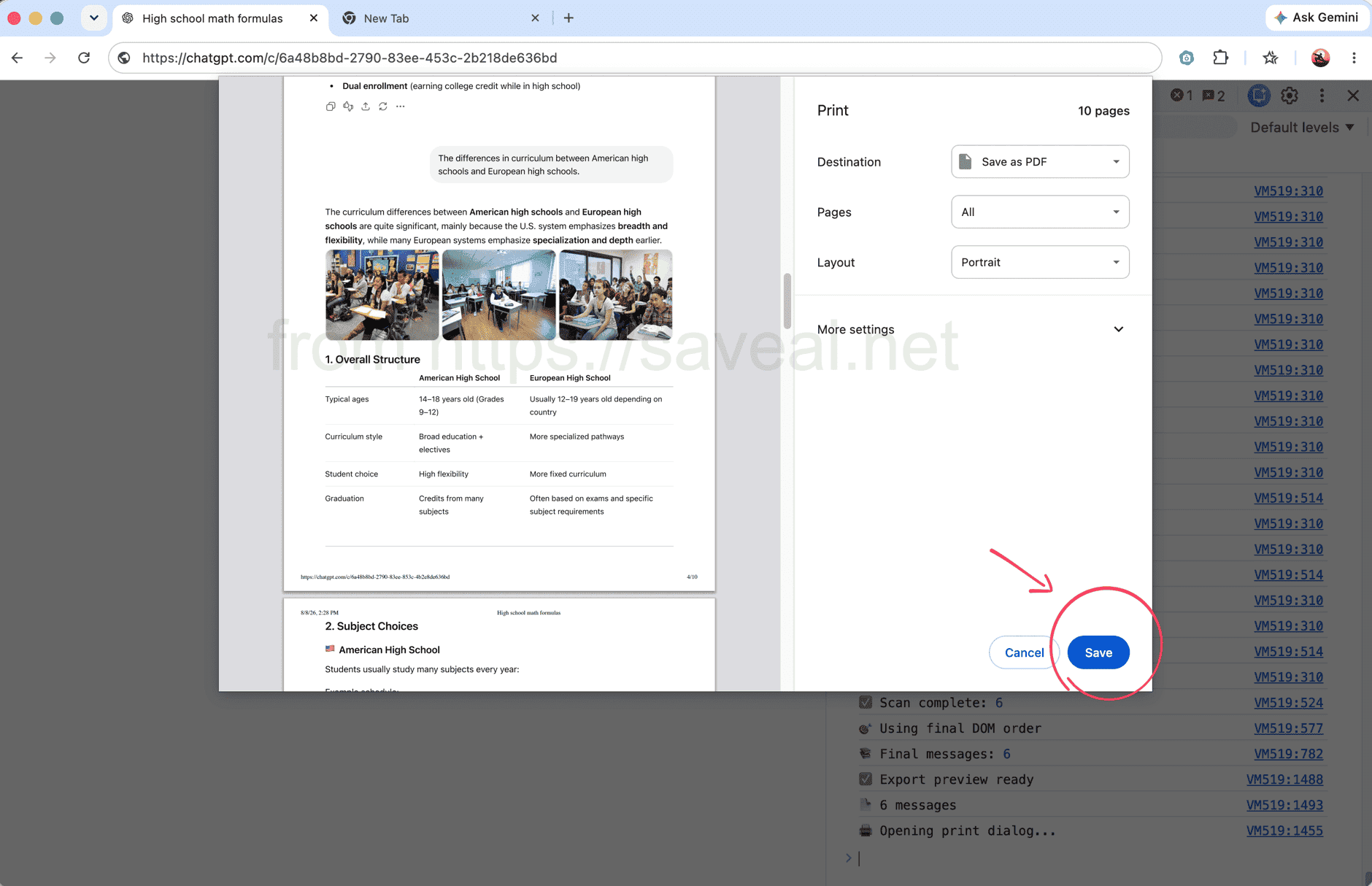
Während des Vorgangs erscheint die Anzahl der Nachrichten in der Konsole; danach öffnet sich automatisch der Druckdialog.
Methode 2: Den vollständigen Chat mit einer Browser-Erweiterung exportieren
Wenn Sie die Entwicklertools nicht verwenden möchten, bietet AI Exporter einen kürzeren Weg. Öffnen Sie den ChatGPT-Chat, klicken Sie in der Chrome-Symbolleiste auf das AI-Exporter-Symbol und wählen Sie im Popup PDF. Die Erweiterung lädt den vollständigen Chat und speichert ihn als PDF.
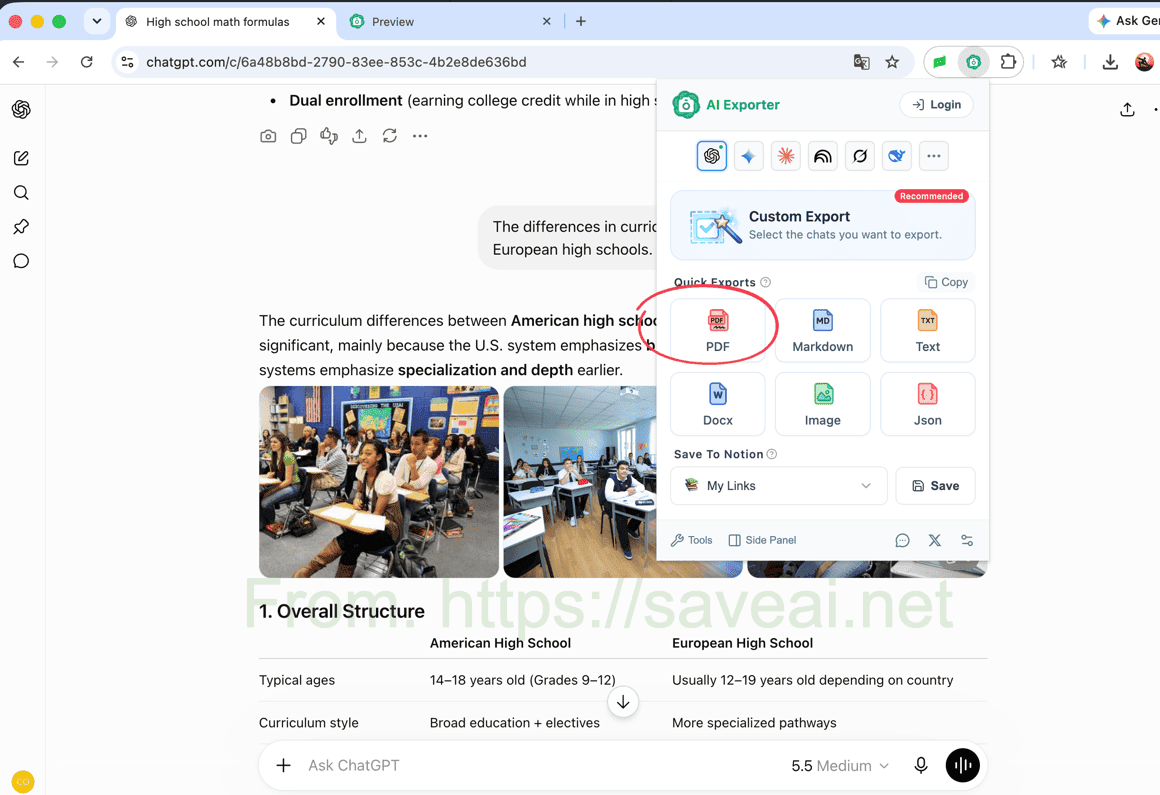
Erweiterung öffnen, PDF auswählen und den vollständigen Chat speichern.
Dafür muss eine Browser-Erweiterung installiert werden. Bei wiederholten Exporten ist die Methode jedoch schneller und erhält Codeblöcke, Tabellen, Bilder und Formeln ohne zusätzliche Einrichtung. Bei Bedarf können Sie auch nur einzelne Nachrichten auswählen.
Welche Methode passt zu Ihnen?
| Ihre Situation | Empfohlene Methode |
|---|---|
| Einmal drucken, ohne etwas zu installieren | Konsolen-Skript |
| Sie kennen sich mit den Chrome-Entwicklertools aus | Konsolen-Skript |
| Sie speichern ChatGPT-Chats regelmäßig | Browser-Erweiterung |
| Code, Tabellen, Formeln, Bilder oder PDF-Einstellungen sollen erhalten bleiben | Browser-Erweiterung |
Für einen einmaligen Ausdruck reicht das Skript. Für regelmäßige Exporte oder ein sauber formatiertes PDF ist die Erweiterung bequemer.
Dieser Originalartikel wurde von Colin verfasst. Bei einer Weiterveröffentlichung geben Sie bitte diesen Artikel mit Link als Originalquelle an.