
كيف أطبع محادثة ChatGPT كاملة؟
قد يطبع ChatGPT جزءًا من المحادثة الطويلة فقط. تعرّف على طريقتين لتحميل جميع الرسائل ثم طباعة المحادثة كاملة أو حفظها بصيغة PDF.
إذا استخدمت Ctrl + P وظهرت بعض رسائل محادثة ChatGPT فقط، فالمشكلة ليست في الطابعة. في المحادثات الطويلة، قد لا يحتفظ ChatGPT بجميع الرسائل داخل الصفحة في الوقت نفسه.
لديك حلان عمليان:
- من دون تثبيت: شغّل السكربت أدناه مرة واحدة، ثم اطبع المحادثة بعد تحميلها كاملة أو احفظها PDF.
- للاستخدام المتكرر: استخدم إضافة تصدير لتحميل المحادثة وحفظها في ملف منسق بنقرة واحدة.
لماذا يطبع ChatGPT جزءًا من المحادثة فقط؟
تعتمد المحادثات الطويلة على العرض الافتراضي: أثناء التمرير، يعرض ChatGPT الرسائل القريبة من موضعك وقد يزيل الرسائل البعيدة مؤقتًا من بنية الصفحة. يساعد ذلك على إبقاء الصفحة سريعة، لكن المتصفح لا يستطيع طباعة عناصر غير موجودة حاليًا في DOM.
يحل السكربت التالي المشكلة عبر التمرير تلقائيًا وجمع الرسائل قبل فتح نافذة الطباعة.
الطريقة الأولى: تشغيل السكربت وطباعة المحادثة كاملة
اختر هذه الطريقة إذا كنت تريد طباعة محادثة واحدة ولا ترغب في تثبيت إضافة.
1. افتح وحدة Console في Chrome
افتح محادثة ChatGPT المطلوبة، ثم افتح أدوات المطور:
- على Mac اضغط
Command + Option + J. - على Windows أو Linux اضغط
Ctrl + Shift + J.
اختر تبويب Console. ستلصق السكربت في خانة الإدخال الموضحة أدناه.
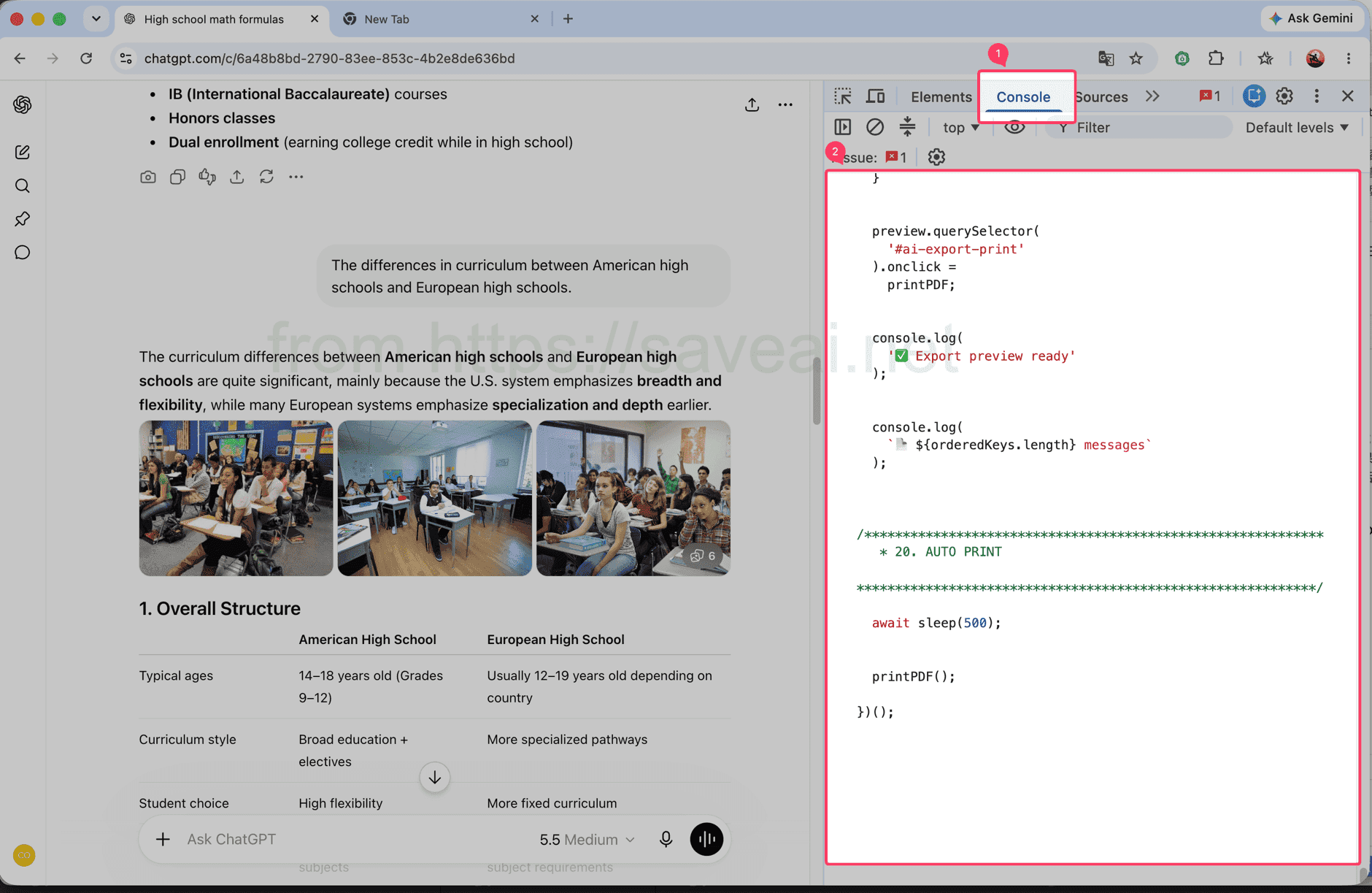
افتح Console ثم الصق السكربت في المنطقة المحددة.
2. انسخ السكربت وشغّله
اضغط Copy أعلى مربع الكود، ثم ارجع إلى Console والصق السكربت واضغط Enter.
// Load and print a complete ChatGPT conversation.
(async () => {
/************************************************************
* CONFIG
************************************************************/
const MESSAGE_SELECTOR = 'section .text-base';
// 每次向上滚动多少个 viewport
const STEP_RATIO = 1.2;
// 每次滚动后的等待时间
const SCROLL_WAIT = 180;
// 到顶部以后等待历史消息加载
const TOP_WAIT = 500;
// 连续几次顶部无变化后结束
const TOP_STABLE_LIMIT = 3;
const sleep = ms =>
new Promise(resolve => setTimeout(resolve, ms));
console.log('🚀 AI Chat Print started');
/************************************************************
* 1. FIND SCROLL CONTAINER
************************************************************/
function findScrollContainer() {
const firstMessage =
document.querySelector(MESSAGE_SELECTOR);
if (firstMessage) {
let el =
firstMessage.parentElement;
while (
el &&
el !== document.body
) {
const style =
getComputedStyle(el);
const scrollable =
el.scrollHeight >
el.clientHeight + 10 &&
(
style.overflowY === 'auto' ||
style.overflowY === 'scroll'
);
if (scrollable) {
return el;
}
el =
el.parentElement;
}
}
const candidates =
[...document.querySelectorAll('*')]
.filter(el => {
const style =
getComputedStyle(el);
return (
el.scrollHeight >
el.clientHeight + 10 &&
(
style.overflowY === 'auto' ||
style.overflowY === 'scroll'
)
);
})
.sort(
(a, b) =>
b.scrollHeight -
a.scrollHeight
);
return (
candidates[0] ||
document.scrollingElement ||
document.documentElement
);
}
const scrollContainer =
findScrollContainer();
console.log(
'📜 Scroll container:',
scrollContainer
);
/************************************************************
* 2. DATA
************************************************************/
const messageMap =
new Map();
const edges =
new Map();
const firstSeenStep =
new Map();
let scanStep = 0;
/************************************************************
* 3. HASH
************************************************************/
function hashString(str) {
let hash =
2166136261;
for (
let i = 0;
i < str.length;
i++
) {
hash ^=
str.charCodeAt(i);
hash =
Math.imul(
hash,
16777619
);
}
return (
hash >>> 0
).toString(36);
}
/************************************************************
* 4. MESSAGE KEY
************************************************************/
function getMessageKey(node) {
const section =
node.closest('section');
const candidates =
[
node,
section
].filter(Boolean);
const attrs = [
'data-message-id',
'data-turn-id',
'data-id',
'id'
];
for (
const el of candidates
) {
for (
const attr of attrs
) {
const value =
el.getAttribute?.(attr);
if (value) {
return (
`${attr}:${value}`
);
}
}
}
const text =
node.innerText || '';
const html =
node.innerHTML || '';
return (
'hash:' +
hashString(
text +
'\n---HTML---\n' +
html
)
);
}
/************************************************************
* 5. COLLECT CURRENT DOM
************************************************************/
function collect() {
const nodes =
[
...document.querySelectorAll(
MESSAGE_SELECTOR
)
];
const keys = [];
for (
const node of nodes
) {
const key =
getMessageKey(node);
keys.push(key);
if (
!messageMap.has(key)
) {
messageMap.set(
key,
node.cloneNode(true)
);
firstSeenStep.set(
key,
scanStep
);
}
}
/**
* 保存当前 DOM 中观察到的顺序:
*
* A -> B
* B -> C
*/
for (
let i = 0;
i < keys.length - 1;
i++
) {
const a =
keys[i];
const b =
keys[i + 1];
if (
a === b
) {
continue;
}
if (
!edges.has(a)
) {
edges.set(
a,
new Set()
);
}
edges
.get(a)
.add(b);
}
console.log(
`📦 step=${scanStep}`,
`DOM=${nodes.length}`,
`total=${messageMap.size}`
);
return {
nodes,
keys
};
}
/************************************************************
* 6. SCROLL TO BOTTOM FIRST
************************************************************/
async function scrollToBottomFully() {
console.log(
'⬇️ Scrolling to bottom...'
);
let stable = 0;
let lastTop = -1;
let rounds = 0;
while (
stable < 3 &&
rounds < 30
) {
rounds++;
scrollContainer.scrollTop =
scrollContainer.scrollHeight;
await sleep(250);
const now =
scrollContainer.scrollTop;
const max =
Math.max(
0,
scrollContainer.scrollHeight -
scrollContainer.clientHeight
);
if (
Math.abs(
now - lastTop
) < 2 &&
Math.abs(
max - now
) < 3
) {
stable++;
} else {
stable = 0;
}
lastTop =
now;
}
console.log(
'✅ Bottom reached'
);
}
/************************************************************
* 7. SCAN FROM BOTTOM TO TOP
************************************************************/
async function scanFromBottomToTop() {
console.log(
'⬆️ Scanning upward...'
);
let topStable = 0;
let safety = 0;
while (
topStable <
TOP_STABLE_LIMIT &&
safety < 10000
) {
safety++;
scanStep++;
collect();
const before =
scrollContainer.scrollTop;
/**
* 还没到顶部
*/
if (
before > 1
) {
const distance =
Math.max(
300,
scrollContainer.clientHeight *
STEP_RATIO
);
scrollContainer.scrollTop =
Math.max(
0,
before - distance
);
await sleep(
SCROLL_WAIT
);
collect();
topStable = 0;
continue;
}
/**
* 已经到顶部
*
* 等待网站继续加载更早消息
*/
const oldHeight =
scrollContainer.scrollHeight;
const oldTotal =
messageMap.size;
await sleep(
TOP_WAIT
);
scanStep++;
collect();
const newHeight =
scrollContainer.scrollHeight;
const newTotal =
messageMap.size;
if (
newTotal > oldTotal ||
newHeight >
oldHeight + 5 ||
scrollContainer.scrollTop > 1
) {
topStable = 0;
console.log(
'➕ Older messages loaded:',
newTotal
);
} else {
topStable++;
console.log(
`⏳ Top stable ${topStable}/${TOP_STABLE_LIMIT}`
);
}
}
collect();
console.log(
'✅ Scan complete:',
messageMap.size
);
}
/************************************************************
* 8. FINAL ORDER
************************************************************/
function getFinalOrder() {
/**
* 最优情况:
*
* 扫描结束后页面已经把全部消息留在 DOM 中。
*
* 这种情况下直接相信当前 DOM 顺序,
* 不再自己排序。
*/
const finalNodes =
[
...document.querySelectorAll(
MESSAGE_SELECTOR
)
];
const finalKeys =
finalNodes.map(
getMessageKey
);
const finalKeySet =
new Set(finalKeys);
const allCollectedPresent =
[...messageMap.keys()]
.every(
key =>
finalKeySet.has(key)
);
if (
allCollectedPresent &&
finalKeys.length
) {
console.log(
'🎯 Using final DOM order'
);
const seen =
new Set();
return finalKeys.filter(
key => {
if (
seen.has(key)
) {
return false;
}
seen.add(key);
return true;
}
);
}
/**
* fallback:
*
* 如果还是严格虚拟滚动,
* 根据之前记录的局部 DOM 顺序重建。
*/
console.log(
'🧩 Rebuilding virtual list order'
);
const allKeys =
[...messageMap.keys()];
const indegree =
new Map();
allKeys.forEach(
key =>
indegree.set(
key,
0
)
);
edges.forEach(
(targets, from) => {
targets.forEach(
to => {
if (
indegree.has(to) &&
from !== to
) {
indegree.set(
to,
indegree.get(to) + 1
);
}
}
);
}
);
let queue =
allKeys.filter(
key =>
indegree.get(key) === 0
);
/**
* 因为是从底部往顶部扫描,
* 越晚第一次看到的消息通常越靠前。
*/
queue.sort(
(a, b) =>
(
firstSeenStep.get(b) || 0
) -
(
firstSeenStep.get(a) || 0
)
);
const result = [];
while (
queue.length
) {
const key =
queue.shift();
result.push(key);
const targets =
edges.get(key);
if (
!targets
) {
continue;
}
for (
const to of targets
) {
if (
!indegree.has(to)
) {
continue;
}
indegree.set(
to,
indegree.get(to) - 1
);
if (
indegree.get(to) === 0
) {
queue.push(to);
queue.sort(
(a, b) =>
(
firstSeenStep.get(b) || 0
) -
(
firstSeenStep.get(a) || 0
)
);
}
}
}
/**
* 防止异常关系导致遗漏
*/
const used =
new Set(result);
for (
const key of allKeys
) {
if (
!used.has(key)
) {
result.push(key);
}
}
return result;
}
/************************************************************
* 9. START
************************************************************/
await scrollToBottomFully();
scanStep++;
collect();
await scanFromBottomToTop();
const orderedKeys =
getFinalOrder();
console.log(
'📚 Final messages:',
orderedKeys.length
);
/************************************************************
* 10. CLEAN OLD PREVIEW
************************************************************/
document
.querySelector(
'#ai-export-preview'
)
?.remove();
document
.querySelector(
'#ai-export-print-style'
)
?.remove();
/************************************************************
* 11. CREATE PREVIEW
************************************************************/
const preview =
document.createElement(
'div'
);
preview.id =
'ai-export-preview';
preview.innerHTML = `
<div id="ai-export-toolbar">
<button id="ai-export-close">
Close
</button>
<button id="ai-export-print">
Print PDF
</button>
<span id="ai-export-count">
</span>
</div>
<div id="ai-export-content">
</div>
`;
preview.style.cssText = `
position: fixed;
inset: 0;
z-index: 2147483647;
overflow-y: auto;
overflow-x: hidden;
background: white;
padding: 0;
`;
/************************************************************
* 12. TOOLBAR
************************************************************/
const toolbar =
preview.querySelector(
'#ai-export-toolbar'
);
toolbar.style.cssText = `
position: sticky;
top: 0;
z-index: 9999;
display: flex;
align-items: center;
gap: 10px;
padding: 12px 20px;
background: white;
border-bottom:
1px solid rgba(0,0,0,.15);
`;
toolbar
.querySelectorAll(
'button'
)
.forEach(
button => {
button.style.cssText = `
padding: 7px 14px;
cursor: pointer;
border:
1px solid #aaa;
border-radius: 6px;
background: white;
color: black;
`;
}
);
/************************************************************
* 13. CONTENT
************************************************************/
const content =
preview.querySelector(
'#ai-export-content'
);
content.style.cssText = `
width: 100%;
max-width: 1000px;
margin: 0 auto;
padding:
30px 40px 80px;
box-sizing:
border-box;
`;
/************************************************************
* 14. AI EXPORTER BANNER
*
* 只在当前页面显示。
* 打印 PDF 时隐藏。
************************************************************/
const lang =
(
navigator.language ||
'en'
)
.replace(
'_',
'-'
);
const aiExporterUrl =
'https://chromewebstore.google.com/detail/' +
'ai-exporter-save-chatgpt/' +
'kagjkiiecagemklhmhkabbalfpbianbe' +
`?hl=${encodeURIComponent(lang)}` +
'&utm_source=chatgptprint';
const promotion =
document.createElement(
'div'
);
promotion.id =
'ai-export-promotion';
promotion.innerHTML = `
<div class="ai-export-promo-main">
<div class="ai-export-promo-badge">
AI Exporter
</div>
<div class="ai-export-promo-text">
<div class="ai-export-promo-title">
Export ChatGPT to PDF with AI Exporter
</div>
<div class="ai-export-promo-description">
PDF, Word, Markdown and more.
</div>
</div>
<a
class="ai-export-promo-button"
href="${aiExporterUrl}"
target="_blank"
rel="noopener noreferrer"
>
Get AI Exporter →
</a>
</div>
`;
promotion.style.cssText = `
margin:
0 auto 34px;
padding:
18px 20px;
max-width:
920px;
box-sizing:
border-box;
border:
1px solid rgba(59,130,246,.25);
border-radius:
14px;
background:
linear-gradient(
135deg,
#eff6ff 0%,
#eef2ff 52%,
#f5f3ff 100%
);
color:
#172554;
box-shadow:
0 6px 22px
rgba(59,130,246,.10);
font-family:
-apple-system,
BlinkMacSystemFont,
"Segoe UI",
sans-serif;
`;
const promoMain =
promotion.querySelector(
'.ai-export-promo-main'
);
promoMain.style.cssText = `
display: flex;
align-items: center;
gap: 16px;
`;
const badge =
promotion.querySelector(
'.ai-export-promo-badge'
);
badge.style.cssText = `
flex:
0 0 auto;
padding:
7px 10px;
border-radius:
8px;
background:
#2563eb;
color:
white;
font-size:
13px;
line-height:
1;
font-weight:
700;
letter-spacing:
.2px;
`;
const promoText =
promotion.querySelector(
'.ai-export-promo-text'
);
promoText.style.cssText = `
flex:
1 1 auto;
min-width:
0;
`;
const promoTitle =
promotion.querySelector(
'.ai-export-promo-title'
);
promoTitle.style.cssText = `
margin-bottom:
4px;
font-size:
16px;
line-height:
1.45;
font-weight:
700;
color:
#172554;
`;
const promoDescription =
promotion.querySelector(
'.ai-export-promo-description'
);
promoDescription.style.cssText = `
font-size:
13px;
line-height:
1.5;
color:
#475569;
`;
const promoButton =
promotion.querySelector(
'.ai-export-promo-button'
);
promoButton.style.cssText = `
flex:
0 0 auto;
padding:
9px 13px;
border-radius:
8px;
background:
#2563eb;
color:
white;
font-size:
13px;
line-height:
1.2;
font-weight:
600;
text-decoration:
none;
white-space:
nowrap;
`;
/**
* 广告放在所有对话最上方
*/
content.appendChild(
promotion
);
/************************************************************
* 15. APPEND MESSAGES
************************************************************/
for (
const key of orderedKeys
) {
const node =
messageMap.get(key);
if (
!node
) {
continue;
}
content.appendChild(
node.cloneNode(true)
);
}
/************************************************************
* 16. MESSAGE COUNT
************************************************************/
preview.querySelector(
'#ai-export-count'
).textContent =
`${orderedKeys.length} messages`;
document.body.appendChild(
preview
);
/************************************************************
* 17. PRINT CSS
************************************************************/
const printStyle =
document.createElement(
'style'
);
printStyle.id =
'ai-export-print-style';
printStyle.textContent = `
@media print {
html,
body {
width:
auto !important;
height:
auto !important;
min-height:
0 !important;
max-height:
none !important;
overflow:
visible !important;
}
body > *:not(#ai-export-preview) {
display:
none !important;
}
#ai-export-preview {
display:
block !important;
position:
static !important;
inset:
auto !important;
width:
100% !important;
height:
auto !important;
min-height:
0 !important;
max-height:
none !important;
overflow:
visible !important;
padding:
0 !important;
margin:
0 !important;
background:
white !important;
}
#ai-export-toolbar {
display:
none !important;
}
/******************************************************
* PDF 中隐藏 AI Exporter 推荐
******************************************************/
#ai-export-promotion {
display:
none !important;
}
#ai-export-content {
display:
block !important;
position:
static !important;
width:
100% !important;
max-width:
none !important;
height:
auto !important;
min-height:
0 !important;
max-height:
none !important;
overflow:
visible !important;
margin:
0 !important;
padding:
0 !important;
}
#ai-export-content > * {
overflow:
visible !important;
max-height:
none !important;
}
}
`;
document.head.appendChild(
printStyle
);
/************************************************************
* 18. CLOSE
************************************************************/
preview.querySelector(
'#ai-export-close'
).onclick = () => {
preview.remove();
printStyle.remove();
console.log(
'✅ Preview closed'
);
};
/************************************************************
* 19. PRINT
************************************************************/
function printPDF() {
console.log(
'🖨️ Opening print dialog...'
);
/**
* 强制完成 layout
*/
preview.offsetHeight;
requestAnimationFrame(
() => {
requestAnimationFrame(
() => {
window.print();
}
);
}
);
}
preview.querySelector(
'#ai-export-print'
).onclick =
printPDF;
console.log(
'✅ Export preview ready'
);
console.log(
`📄 ${orderedKeys.length} messages`
);
/************************************************************
* 20. AUTO PRINT
************************************************************/
await sleep(500);
printPDF();
})();السكربت طويل، لذلك استخدم زر النسخ بدل تحديده يدويًا.
لا تلصق أي كود في Console إلا إذا كنت تثق بمصدره، ولا تشغّله إلا على محادثات يحق لك الوصول إليها.
3. انتظر فتح نافذة الطباعة
اترك تبويب ChatGPT مفتوحًا. يمر السكربت على المحادثة تلقائيًا، وتعرض Console عدد الرسائل التي جُمعت. قد تستغرق المحادثات الطويلة وقتًا أطول.
بعد انتهاء الفحص تفتح نافذة الطباعة تلقائيًا. اختر طابعتك للطباعة على الورق، أو اختر Save as PDF من قائمة الوجهة ثم اضغط Save.
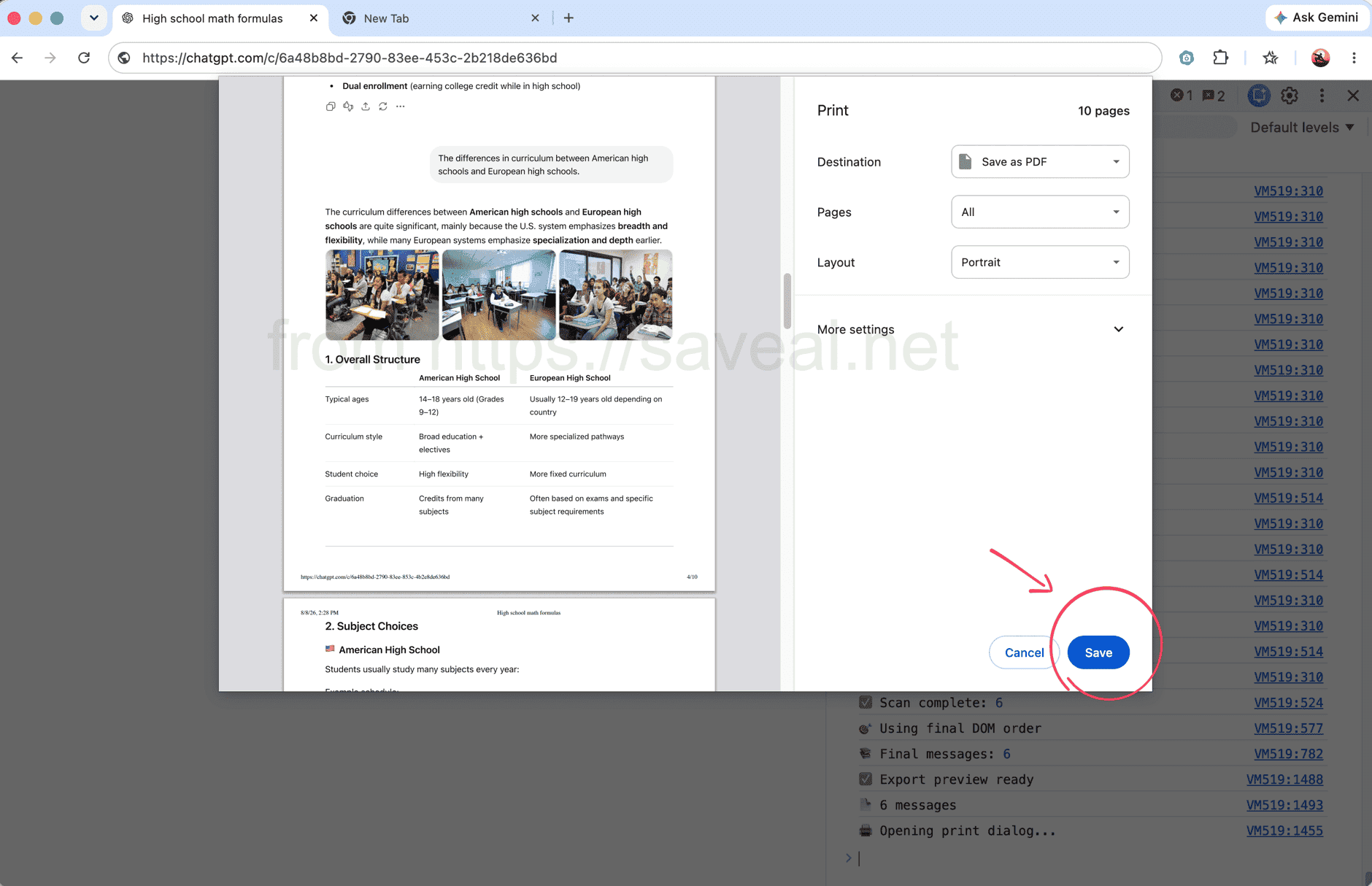
بعد جمع الرسائل كاملة، يفتح Chrome نافذة الطباعة.
الطريقة الثانية: تصدير المحادثة كاملة بإضافة المتصفح
إذا لم ترغب في استخدام أدوات المطور، يمكنك استعمال AI Exporter . افتح المحادثة، واضغط أيقونة الإضافة في شريط Chrome، ثم اختر PDF. تحمل الإضافة المحادثة كاملة وتحفظها في ملف واحد.
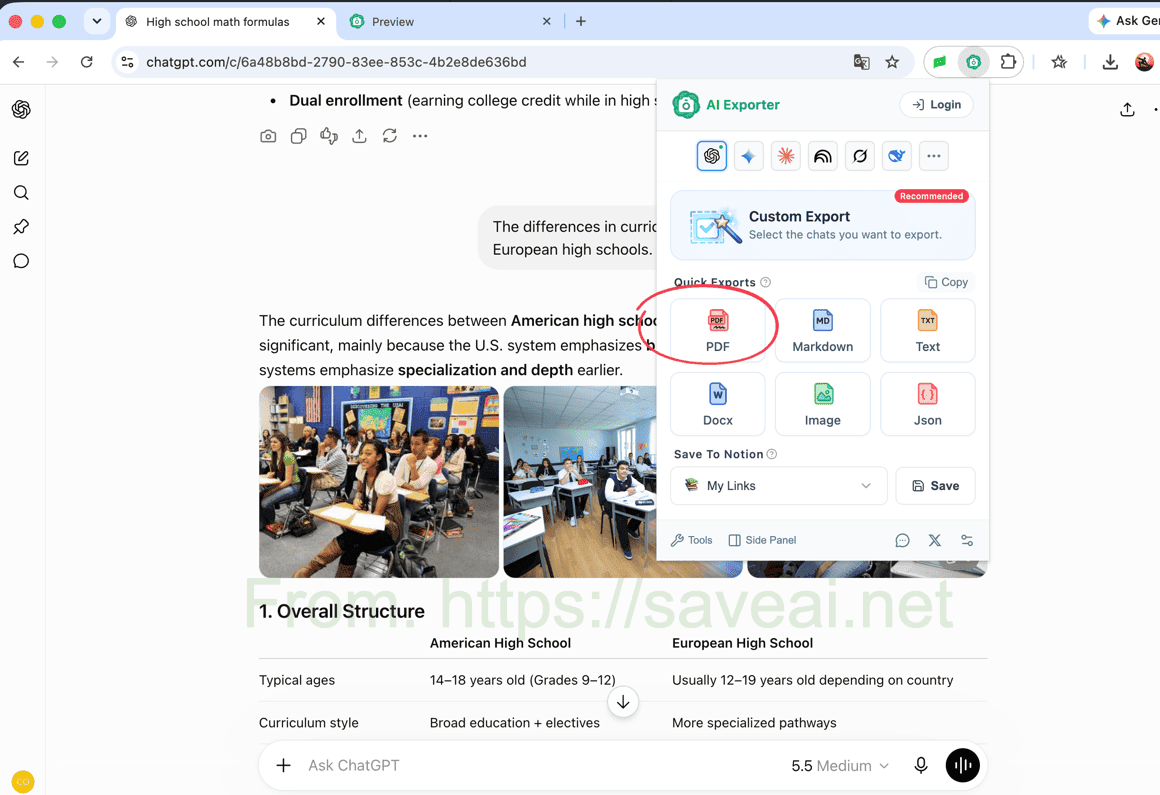
افتح الإضافة ثم اختر PDF لتصدير المحادثة.
تتطلب هذه الطريقة تثبيت إضافة، لكنها أسرع عند تكرار التصدير، وتحافظ على كتل الأكواد والجداول والصور والمعادلات من دون إعداد إضافي. كما يمكنك تحديد رسائل بعينها إذا لم تكن بحاجة إلى المحادثة كاملة.
أي الطريقتين تناسبك؟
| حالتك | الخيار الأنسب |
|---|---|
| تريد طباعة محادثة واحدة من دون تثبيت شيء | سكربت Console |
| معتاد على استخدام أدوات مطور Chrome | سكربت Console |
| تصدّر المحادثات بصورة متكررة | إضافة المتصفح |
| تحتاج تنسيق الأكواد والجداول والصور أو خيارات PDF | إضافة المتصفح |
للطباعة مرة واحدة، ابدأ بالسكربت. أما للتصدير المتكرر أو للحصول على PDF أكثر ترتيبًا، فاستخدم الإضافة.
كتب Colin النسخة الأصلية من هذا المقال. عند إعادة نشره، يرجى إضافة رابط إلى هذه الصفحة بوصفها المصدر الأصلي.