
Customize PDF and Image Style
AI Exporter offers a range of flexible personal preference settings, allow you to adjust the final appearance of your exported files. Whether it’s changing the theme color, font size, or showing timestamps, you can configure it all in the Settings Center.
⚙️ 1. Enter Settings Center
To adjust the export style, first click the extension icon in your toolbar to open the main panel, then click the Settings icon in the top-right (or bottom) corner to enter our unified settings page.
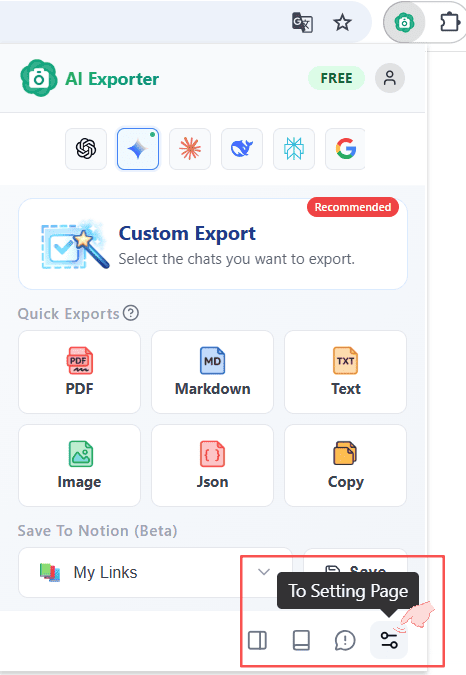
🎨 2. Comprehensive Export Options
In the Settings Center, all visual style settings are grouped together. Changes you make will be applied immediately to your next export.

Detailed configuration items:
-
📏 Width Choose different layout sizes, such as
Desktop,Tablet, andMobile. (💡 Tip: For layout engine stability, this setting currently only applies to PNG images) -
🌗 Theme Change the overall visual style of conversation bubbles. Three styles are currently supported:
Light: Standard clean light mode.Dark: Sleek deep dark mode.Memo: A rustic card-based style that mimics physical note cards.
-
🔠 Font Size Adjust text size for easier reading or printing. Supports
Small(default),Medium, andLarge. -
🕒 Show Timestamp When enabled, exported cards will display the actual time you sent or received each message, helpful for future tracing.
-
🤔 Show Thinking Powerful deep-inference models often output long internal thinking processes. This toggle allows you to choose whether to keep and print these sections in your exports. (💡 Tip: Only applicable to models like Gemini, DeepSeek, and Claude that support and output thinking processes).
⚠️ Note: Most visual enhancements (such as width layout, font size, and theme changes) are specifically designed for rendering beautiful PDF documents and Images (PNG); if you choose to export as plain text Markdown, these visual features will not be applied to the output.
✨ 3. Final Result Example
Once your changes are applied, your high-res images and PDFs will carry your unique visual choices – including thinking processes, specific timestamps, and custom backgrounds.
